Computer Networking for devops
Hi, I'm vaseem akram, a dedicated and passionate DevOps Engineer with extensive experience in automation, continuous integration, and infrastructure management.
ab samajthey hey ae computer networking kiun important hey
as a devops engineer aapko kuch kuch task karni hothi hey - jaisey infra structure management
aapko vm setup karna hotha hey apna server setup karna padtha hey - us server mey internet routing karna padtha hey - us server ko proper connectivity milri hey kya , security milri hey kya , automation key thriugh create hora hey kya
devops engineer boltha hey ek server instance create kar saktha hun , ismey ipv4 use karoe , ipv6 jab devops confuse hojatha hey
phir ae aatha hey ki on primise ka setup jamana gaya
aws aap netwroking mey kaisa karogey hum olenge , train with shubha ney bola ec2 mey instance create karthey hey - client aakey bolega isko na aek vpc key andar dalo , hum phir sey confuse hojathey vpc ek private cloud hey internet kaisa milega vpc key andar aisey aapko bohot saare situations and scenarios aathey hey jismey networking bohot use aathi hey
How does the internet work ?
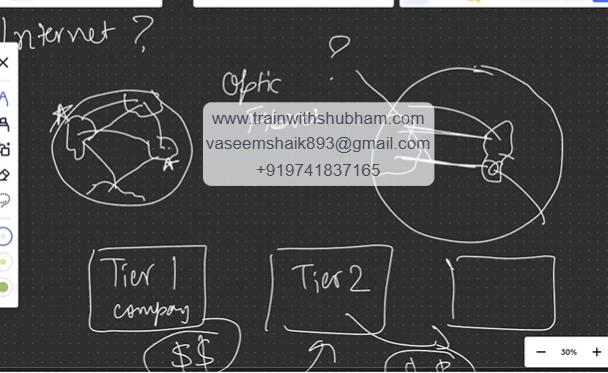
ae jo internet hey ae kaisa chaltha hey . - internet jabbi in logeney start kiya tha basically pura globe mey alag alag continent hey - in logon ko connect karnekey liye network hey one person to another person mai india mey hun sumiya poland hey unko kaisa connect karey us cheez key liye optic fibers use huey baically wires jaisa rehthey hey samundhar ey andar jakey jakey connect karwathey hey
pura world mey internet flow hotha hey data transfer hotha hey through optical fiber which is kept inside the river
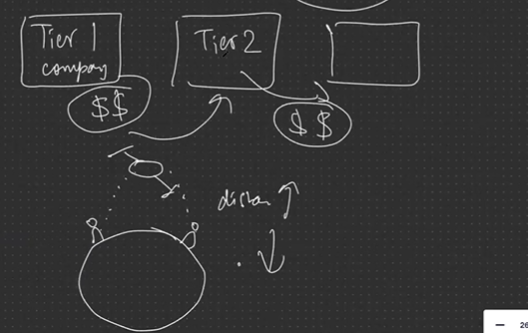
ae optic fiber kiska hey - ae tier 1 companies ka big big companies ka hey - ab tier2 company bolthi hey bhaiyya aap ka jo optic fiber hey ne vo humko rent mey dedo kiunki hamara shyaam vo usney bandhi sey bath karni hey ae tier1 ney $$ mey tier 2 ko rent ko dey dethi hey ae tier2 ney tier3 like vodaphone in companies ko dethi hey
why do you prefer optical cable over satilite
- because distance
ae kaisa access hotha hey - samajlo ek badasa duniya hey - tier1 sabka jaal bana key raka hey - tie2 rent lekey rakha hey tier3 companies like codaphone , airtel insey lekey humsey paisa lekey internet server kartha hey data provide karra hey
tier 3 companies ae kaisa kaam karthey hey
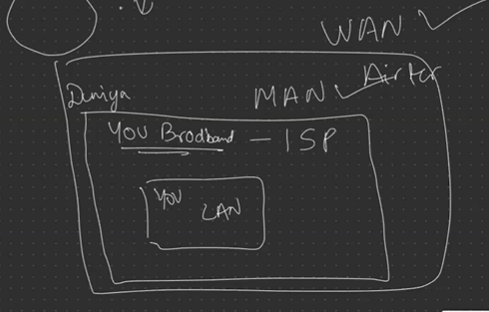
aisa samjlo ki aas pass hamara dost rehtha hey u broadband , jio , airtel broadband ae aapko internet deneykey liye tayar hey - ae ek isp hey
ae basically ek level pey kaam karra hey ae city key level key level pey aapko network provide karra hey usko bolthey hey MAN → metropolitan area network
agar aehi cheez lets say u broad band airtel sey lera hoga airtel tier2 company hey ae , aisa b ho saktha hey u broadband airtel key pass jatha hey boltah hey ki hu,mko rent pey dedo humsey thoda paisey lelo aisa airtel kithney ko b dey sakthey ae WAN wide area network mey kaam kartha hey bada hey na badi comapny bohot saarey logon ko dey sakthey hey
ab aapka isp aapkey gharthak internet paunchatha hey ae aatha hey LAN - local area network
OSI Model : full form → open system inter-connection ab samajthey ae osi kya hey
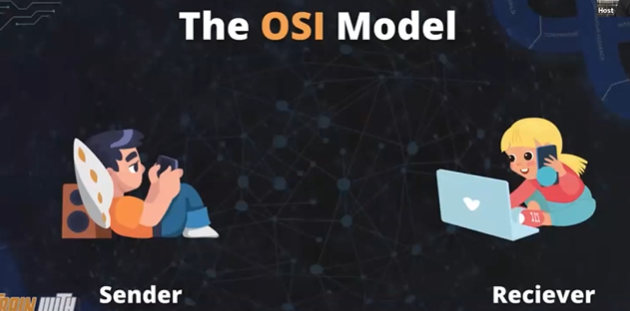
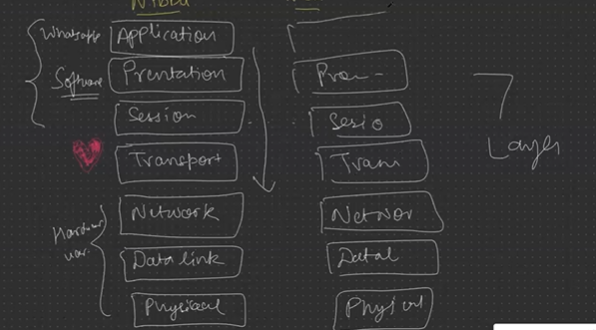
aisa samajlo ae aek logical kind of standard set kar diya hey
ae kaisa chaltha hey - chalo nibba and nibbi hey apney
nibba and nibbi kaisa bath karrey hey ae ho kya raha hey - kounsa application mey bath karrey hey for ex: whatsup
aap kisi nibba nibbi ko message bhejthey ho - aapko ek msg dikhatha hey uppar end to end encryption
beech mey na presentation layer rehthi hey inki bathon ko format karthi hey encrytp karthi hey thaki inki bathon ko na koi b na sun sakey kiunki ae log privacy sey bath kar sakey
jab nibba and nibbi online dikhthi hey thab message kar sakthey hey in dono ko beech mey session maintain hothi hey - jab dono online mey ho
jab inkey dono neech mey dil ki bath aajthi hey transport hojath hey nibba nibbi ki bathey
pehley three layers are software lawyer - ek baar transport honey laga phir jo messages janey lagey ne vo internet through jayega iskey badh network layer hey - network toh milgaya ab nibbi ka address kya device address - yaa data-link layer - ek baar dil judgaya phir nibbi key pass wifi connectivity - router physical layer honi chahiye nibbi key pass agar wifi nahi hey aa kithey b messages bhejo nahi reach hoyenge usko
ae transport sey na hardware lawyers hey
nibbi key pass physical layer honi chahiye phir device address i mean data -link - phir network hona chahiye
Soft of OSI
ae 7 layers kaisey kaam karthey hey - ae jo application layer hey ae ui hotha hey vo browser hotha hey jispey aap basically internet ko access karthey hey
phir aapka presentation layer hotha hey aapka jo data alag format hey hotha hey , network ko thoda jumbled way mey samaj mey aatha hey isko format kartha hey presentation layer
phir session layer aap key pass ek client hey - aap aur aap key client key beech mey session maintain rakhna hey jo break na ho isliye session layer ek security maintain kartha hey sirf dono ko beech mey ae sab rehtah hey software part phir aatha hey
Hard of OSI :
transport layer - basically data ko transport kartha hey using some types of protocals , matlab set of rules is device sey us device ko bhejna hey kuch set of rules hey for ex: tcp /ip → transmission conrol protocal or internet protocal ae kuch rules hey jiskey vajhasey vo data transfer ho patha hey isliye ae center mey rehtah hey
ek baar aapka data transfer honey laga - aapko vo data transfer honey key liye aapko ek network lagtha hey toh aapko chahiye network layer is network layer mey baically saarey protocals rehthey hey [ip] - internet protocal for ex: file transfer karni hey iskey liye particular tyr ka protocal , dns ko , email ko is cheezon ko particaular type of protocals rehthey hey phir aatha hey
data-link - ae aisa samajlo network decide hogaya but vo jo nibba and nibbi hey unkey pass jo device hey unkey device ka mac address , ip address kya hey vo data link layer pey ip , mac address ae sab patha chaljatha hey jiskey liye alag protocals rehthey hey like [ARP , RARP]
mac ko find kartha hey arp and ip address ko find kartha hey using RARP.
last ab cables aathey hey physical layers mey aathey hey , cables , NIC Network integrated chip , wifi , lan cables.
AB SAMAJTHEY HEY TCP/IP MODEL
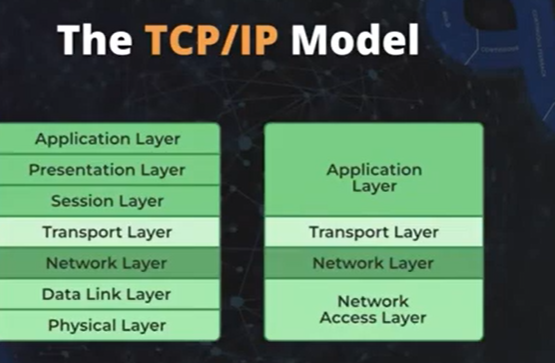
OSI model aek standard iso ney standard bana diya tha but reality ki bath aathi hey ek model use aathi hey TCP/IP model hi use hothi hey
osi ek logical model -jo real life mey use karthey hey in the way of tcp/ip model both are same .
[ TCP / IP ] -
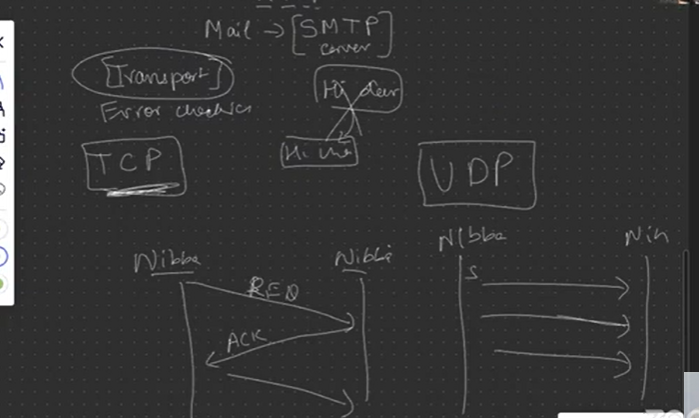
applicaton layer → ismey aapka ui , broser , snapchat , whastup rahega but usmey protocals use hothey hey vo b mention kara na hey web pages browse hothey hey html mey jab b browser mey http , agar mail karrey ho - smtp -simple mail transfer protocal ae sab cheeze batani honi chahiye
Transport layer → jaha pey actual mey aapka data tarnsfer hoga - ek nibba hey usney nibbi ko hi bheja uskey jagah jakey hi chudel karkey gaya isney bheja hi dear - nibbi key pass pahuncha hi chudel ae aisa na ho is layer mey error checking , checksome , packets kithey transfer horehey , ae packets securely jarehey yah nahi , is cheez key liye transport layer mey protocals hey jaisey TCP - transmission control protocal aek secure connection banadetha hey for ex:
ek nibba ney ek nibbi ko msg bheja - ae msg gaya , nahi gaya is cheez ka ek acknowledgement aatha hey agar vo acknowledgement nibba key pass aayage thab hi aagey badega ae tcp hey na ae aek three way handshake and secure protocal hotha hey ae transport layer mey hotha hey
omegel mey UDP → user datagram protocal mey aapka nibba aapkey nibbi ko msg bhejtha rahega agar pahuncha toh theek hey nahi toh koi bath nahi yaha secure nahi hey send hojatha hey response miljatha hey basically acknowledgement wala thing nahi rahtha
udp connection less hotha hey
Network layer / internet layer : pey aapkey ip address pey bath hori hothi hey - aap ka source ip kya hey , destination ip kya hey in sab cheezon pey bath hothi hey
jab mai www.google.com - > first application layer hey ae phir iskey badh transport layer baically data ghoomkey jayega phir iskey badh network layer aathi hey ismey source ip and destination ip kaisa patha karthi hey isko trace arna hey traceroute google.com → ae hey mera ip iskey badh ip hey internet service provider
ip locater → sourceip find → yaha sey request kaha pey gayi isp pey → phir vaha sey mumbai aaya ae tcp hey ab ae california ko gaya vaha google ka server pey gaya → kuch packet drop nahi hua
ab samajthey hey Network access layer hey vo kya kartha hey hamae transport layer samaj mey aagaya
address resource protocal [arp] aapki source ka ip , mac ip and , reciever ip bhejdetha hey lekin mac ip patha nahi hotha hey is cheez ko na braodcast kar detha hey ip address key sath network mey jo registered address dikha detha hey
Mac address: ek physical device address hotah hey thaki recognize kar sakey , agar mac address patha karna hey isliye ek protocal rehtha hey arp → address resource protocal -→ mac address remains same - bacially aap ki ip address key sath ek mac address jud jatha hey
abhi mummy and papa tv dekhre merko unka mac ip patah karna hey mai apney roter mey login karunga , 198.168.0.1 -→ login karo ae karnekey badh mere ghar ka computer networking chalra hey dhcp clients mey bata tha hey ki koun koun is router mey juda hua hey - ip address aek logical address , mac address ek physical address hey
kabhi kabhi mac address appko patha nahi rehta isliye arp - mujhey mera mac ka patha nahi toh mai router ko bolunga mera mac ka mac address dedo mai isko bolunga mujhko apna id address dedo us ip ko mai broadcast karunga ussey jo b connected hey ame network mey hey mujhko uska mac address miljayega vo mac address mai aapko dedunga
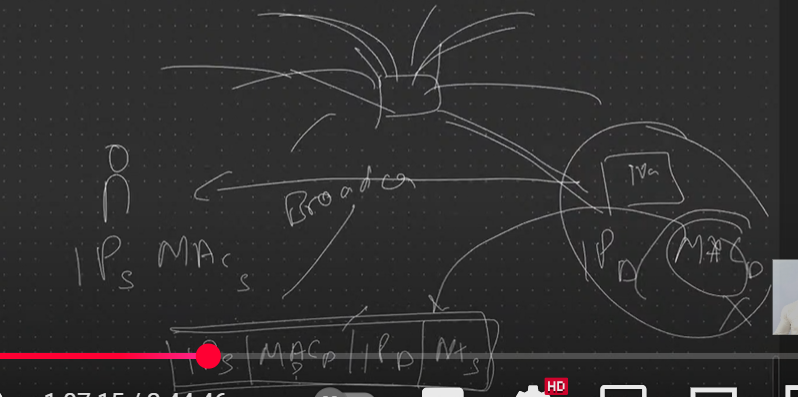
by roadcasting it will braidcast and by unicasting it will send mac address to you personally .
CAN - campus area network
dhcp: DYNAMIC HOST CONFIGURATION PROTOCAL - through this we can restrict the access , we can give the access .
- RARP: same tharikey sey RARP same process hotha hey ip address patha nahi rehtha vo miljatha hey .
IMPORTANT PROTOCALS :
dns - domain name system : jab b aap likhthey ho www.trainwithshubham.com ae ek domain name iskey background mey ek server hey mai server mei jaunga nahi mai sirf tws.com likhunga ae tws domain map kiya gaya hey aek ip sey aek address sey map hp chuka hey
- go to go daddy - ae ek platform where we can register our domain name - here now i can purchase the domain mainey aws pey yah kahi pey server liya aur us server oey us website dali , ab aisa kuch ho mai tws.com lu background mey server khulgaye ae kartha hey godaddy - go to manage dns and -dns records - is address book mey ek domain lekey address assign kardetha hun
FTP: [file transfer protocal] -> aek aisa connection bitaletha hey client ki thaki ek sercurely files ko transfer kar pau .
index of games - toh ek ftp ka server hey
mai ek ftp client like filezilla leletha hun aur jo b merko chahiye from sever download kar letha hun
telnet : (terminal network ) - ae first protocal tha jissey ki aap kisi b remote ko acess karthey they
- mujhey yaha baitkey kisi remote server ko connect karna hey yah toh mai ssh , or telnet sey b kar saktha hun telnet sey ui b dekhsaktha hun
SMTP : [ simple mail transfe protocal ] - aap ubuntu mey ubuntu smtp setup sendemail
SNMP [ simple network management protocal] - kisi network ko manage karna hey snp use karthey hey bohot rarely use hotha hey
http [ hyper text transfer protocal ] - api calls , jithey b web pages load , request api calls hothey hey http protocal through .
http pa port number 80
https ka 443
→ ae http methods bohot important hey ae client and server https through aek server sey bathey karna chahtha hey
client sends request and server sends responce what he wil talk , either he wants to read , write , update , and delete the data
agar aapko read karna hey get method , agar write karna hey post method , agar update karna hey - put method and delete karna hey - delete method .
Data-link + physical layer combines = Network access layer
- Network access layer :
AWS Practical :
Is duniya mey kithna sara internet hoga , kithna sara ip address hoa , kithney saare ip address hogi
ae mera ghar mai mummy , papa , didi mere pass ek phone hey ek lap hey ek har , mummy , papa , and didi jey pass mobile hey aek har ek devices ko ek ip assign hotha hey aisa ek gharmey 7 devices ip address aisey ek mohelley mey kithne ghar honge
aapmey shehar mey kitne honge aisey kithne shehar kithne honge aise aise shehar kithey countries mey honge ithne sarey ip address manage nahi kar sakthey toh
IPV4 - internet protocal version 4 limited ip address detha hey -→ no of ip address in ipv4 424 croces agar peoples badh gaye toh thab aaya ipv6 ae bada internet hey ismey chota chota internet banayenge like subnets is subnets mey aap ip address banavo subnet mey ip address unique honge
ae jo vpc hey ae aapka personal network hey - is ko design karn ahey is vpc ko aap ek region mey banathey ho , ismey vpc daloge ismey subnet dalogey basically chota chota internet , agar aapka koi device hey public ko face karani hey vo hoga aapka public subnet agar aapka kuch data base hey privately rahna hey toh aapka private subnet
ab ae toh ban gaya is vpc mey internet kaisa ghuseka iskey liye ek internet gateway banan hey thaki vpc mey internet ki acacces hojaye , bahar ki duniya sey bathey hopaye isliye gateway chahiye
is public subnet mey ek ec2 instance hey , private subnet mey rds hey
ae public subnet aur private subnet ko kaisa patha chalega ki internet ko kaha route karana hey , yah phir kis ip address ko kya routing honi chahiye is cheez key ek route table b chahiye hoga jaha pey aap apney public aur private subnet ka info dedoge
ki bhaiyya is private subnet mey jithney b hey sab ko internet dedo -→ agar aapko internet access karana hey OSI model ko follow karna padtha hey → physical karwana hey
mai devops engineer mey task mila hey ujhey secure tarikey sey secure instances chalana hey mujhey sabsey vpc mey chalo → region select karlo - us region mey vpc create karunga → vpc and more → name tws-networking
ab preview dekho aapka jo vpc name - uskey andar kithne subnets banana hey humko delect karna hey
ab question aatha hey ab CIDR BLOCK kya hotha hey - us subnets mey jithney b devices rahenge un sabko ip address kya kya assign honge → classless interdomain routing —> basically aapkey subnets mey kithney ip address assign kiya ja saktha hey ek notaton rehta hey —> google karo cidr xyz
will i really get 65536 ips no aws khu 5 ips letha hey khud support key liye detha hey
pehley vpc phir , subnets ismey a.z phir subnets ko internet chahiye na jithney b ips hey isko route chahiye na isliye public ko ek route table private 2 ko 2 private route tables
internate gateway rehtha hey public subnet key liye
s3 gateway hoga private subnet key liye → create vpc
now create the instane in under your vpc and give info based on your requirement.
Hin-English Explanation
Kyun Computer Networking Important Hai for DevOps?
Ek DevOps engineer ke liye networking bohot zaroori hai kyunki aapko infrastructure manage karna padta hai. Jaise:
VM ya Server Setup: Aapko virtual machines (VM) ya servers setup karne padte hain. Isme internet routing, connectivity, aur security ensure karna hota hai.
Automation: Servers ya instances ko automate karna padta hai, jaise provisioning ke through.
IPv4 vs IPv6 Confusion: Jab aap ek instance create karte ho, toh IPv4 ya IPv6 ka use hota hai. IPv6 thoda complex lagta hai kyunki isme zyada IPs hote hain.
On-Premise vs Cloud: On-premise setup mein networking ka kaam alag hota hai, aur cloud (jaise AWS) mein VPC (Virtual Private Cloud) ke saath kaam karna padta hai. Client bolta hai, “Isko VPC ke andar daal do,” aur yeh confuse karta hai kyunki VPC private hota hai, toh internet kaise milega?
AWS mein Networking Kaise Kaam Karta Hai? AWS mein, jab aap ek EC2 instance create karte ho, client bolta hai, “Isko VPC ke andar daal do.” VPC ek private cloud jaisa hai, jisme aap subnets banate ho (public aur private). Public subnet internet se connect hota hai, private subnet secure rehta hai (jaise database ke liye). Internet access ke liye Internet Gateway banate hain, aur routing ke liye Route Tables use hote hain jo decide karte hain kaunsa traffic kahan jayega.
Internet Kaise Kaam Karta Hai?
Global Connectivity: Internet pure globe ko connect karta hai. Alag-alag continents ke beech optical fiber cables hote hain, jo samundar ke neeche bichhe hote hain. Yeh cables data transfer karte hain.
Tier System:
Tier 1 Companies: Yeh badi companies hoti hain jo optical fibers ka network banati hain aur own karti hain.
Tier 2 Companies: Yeh Tier 1 se fibers rent pe leti hain aur Tier 3 ko deti hain.
Tier 3 Companies (jaise Airtel, Vodafone): Yeh ISPs (Internet Service Providers) hote hain jo humein internet provide karte hain. Yeh city level pe kaam karte hain aur MAN (Metropolitan Area Network) banate hain.
LAN, MAN, WAN:
LAN (Local Area Network): Ghar ya office ke andar ka network.
MAN: City-level network jo ISP provide karta hai.
WAN (Wide Area Network): Bada network jo multiple cities ya countries connect karta hai.
Optical Fiber vs Satellite: Optical fiber zyada pasand kiya jata hai kyunki satellite se distance aur latency zyada hoti hai. Optical fiber fast aur reliable hota hai.
OSI Model Kya Hai? OSI (Open System Interconnection) ek logical standard hai jo networking ko layers mein samjhta hai. Yeh 7 layers hote hain:
Application Layer: Yeh UI hota hai (jaise browser, WhatsApp). Yahan HTTP, SMTP jaise protocols kaam karte hain.
Presentation Layer: Data ko format aur encrypt karta hai (jaise end-to-end encryption WhatsApp mein).
Session Layer: Client aur server ke beech session maintain karta hai (jaise jab dono online hote hain).
Transport Layer: Data transfer karta hai using protocols jaise TCP (secure, acknowledgement deta hai) ya UDP (fast, no acknowledgement).
Network Layer: IP addresses aur routing handle karta hai (jaise source aur destination IP).
Data-Link Layer: Device ke MAC address aur IP address ka pata lagata hai (ARP, RARP protocols use hote hain).
Physical Layer: Cables, NIC (Network Interface Card), Wi-Fi jaise hardware hote hain.
TCP/IP Model Kya Hai? TCP/IP model OSI ka practical version hai jo real-world mein use hota hai. Iske 4 layers hote hain:
Application Layer: Browser, WhatsApp, email (HTTP, SMTP protocols).
Transport Layer: Data transfer ke liye TCP (secure, three-way handshake) ya UDP (fast, no acknowledgement).
Internet Layer: IP addresses aur routing (source aur destination IPs).
Network Access Layer: Data-Link aur Physical layer combine hote hain. Yeh MAC address, cables, aur hardware handle karta hai.
Important Protocols:
DNS: Domain names (jaise trainwithshubham.com) ko IP address se map karta hai.
FTP: Files securely transfer karta hai.
Telnet/SSH: Remote server access ke liye.
SMTP: Email transfer ke liye.
SNMP: Network management ke liye (rarely used).
HTTP/HTTPS: Web browsing ke liye (port 80 aur 443).
ARP/RARP: MAC address aur IP address find karne ke liye.
AWS Practical:
VPC Setup: AWS mein VPC create karte ho ek region mein. Isme subnets banate ho (public aur private).
CIDR Block: Yeh decide karta hai kitne IP addresses ek subnet mein honge (jaise /16 mein 65,536 IPs, lekin AWS 5 IPs reserve karta hai).
Internet Gateway: Public subnet ko internet se connect karta hai.
Route Tables: Decide karte hain kaunsa traffic kahan jayega.
S3 Gateway: Private subnet ke liye S3 access ke liye.
Example:
VPC create karo (name: tws-networking).
Subnets banao (public aur private).
Internet Gateway attach karo public subnet ke liye.
Route Tables banao aur IPs assign karo.
EC2 instance public subnet mein aur RDS private subnet mein rakh do.
Full English Explanation
Why is Computer Networking Important for DevOps? For a DevOps engineer, networking is critical because it underpins infrastructure management. Key tasks include:
VM and Server Setup: Setting up virtual machines (VMs) or servers requires configuring internet routing, ensuring connectivity, and securing the infrastructure.
Automation: Automating server provisioning and instance creation is a core responsibility.
IPv4 vs IPv6: DevOps engineers often work with IPv4 for simplicity, but IPv6 can be confusing due to its vast address space.
On-Premise vs Cloud: On-premise setups involve physical networking, while cloud environments (like AWS) use Virtual Private Clouds (VPCs). Clients may request instances to be placed in a VPC, which can be confusing as VPCs are private by default, raising questions about internet access.
Networking in AWS In AWS, you create EC2 instances and place them in a VPC, which acts like a private cloud. A VPC contains subnets:
Public Subnet: Connects to the internet (e.g., for web servers).
Private Subnet: Isolated for secure resources (e.g., databases). To enable internet access, you attach an Internet Gateway to the VPC. Route Tables define how traffic is routed between subnets and the internet.
How Does the Internet Work?
Global Connectivity: The internet connects the globe via optical fiber cables laid under oceans, enabling data transfer across continents.
Tier System:
Tier 1 Companies: Own and manage the global optical fiber network.
Tier 2 Companies: Rent bandwidth from Tier 1 and provide it to Tier 3.
Tier 3 Companies (e.g., Airtel, Vodafone): Act as Internet Service Providers (ISPs), delivering internet to end-users at the city level, forming a Metropolitan Area Network (MAN).
LAN, MAN, WAN:
LAN (Local Area Network): Connects devices within a home or office.
MAN: Covers a city, managed by ISPs.
WAN (Wide Area Network): Connects multiple cities or countries.
Optical Fiber vs Satellite: Optical fibers are preferred over satellites due to lower latency and higher reliability. Satellites have higher latency because of the distance signals must travel.
What is the OSI Model? The OSI (Open System Interconnection) model is a logical framework that standardizes networking functions into 7 layers:
Application Layer: Provides user interfaces (e.g., browsers, WhatsApp). Uses protocols like HTTP, SMTP.
Presentation Layer: Formats and encrypts data (e.g., WhatsApp’s end-to-end encryption).
Session Layer: Maintains sessions between client and server (e.g., ensuring both are online).
Transport Layer: Handles data transfer using protocols like TCP (secure, with acknowledgements) or UDP (fast, no acknowledgements).
Network Layer: Manages IP addresses and routing (source and destination IPs).
Data-Link Layer: Handles device addressing (MAC and IP addresses) using protocols like ARP (Address Resolution Protocol) and RARP (Reverse ARP).
Physical Layer: Involves hardware like cables, Network Interface Cards (NICs), and Wi-Fi.
What is the TCP/IP Model? The TCP/IP model is a practical implementation of the OSI model, used in real-world networking. It has 4 layers:
Application Layer: Includes user interfaces and protocols like HTTP, SMTP, and FTP.
Transport Layer: Manages data transfer with TCP (reliable, with three-way handshake) or UDP (fast, connectionless).
Internet Layer: Handles IP addressing and routing.
Network Access Layer: Combines Data-Link and Physical layers, managing MAC addresses, cables, and hardware.
Key Protocols:
DNS (Domain Name System): Maps domain names (e.g., trainwithshubham.com) to IP addresses.
FTP (File Transfer Protocol): Enables secure file transfers.
Telnet/SSH: Allows remote server access (SSH is more secure).
SMTP (Simple Mail Transfer Protocol): Used for email transfer.
SNMP (Simple Network Management Protocol): Manages networks (rarely used).
HTTP/HTTPS: Powers web browsing (ports 80 and 443).
ARP/RARP: Resolves MAC and IP addresses.
AWS Practical Networking:
VPC Creation: Create a Virtual Private Cloud in a specific AWS region. A VPC contains subnets (public and private).
CIDR Block: Defines the range of IP addresses for a subnet (e.g., /16 provides 65,536 IPs, but AWS reserves 5 IPs for internal use).
Internet Gateway: Connects public subnets to the internet.
Route Tables: Define traffic routing for public and private subnets.
S3 Gateway: Provides private subnets access to S3 without internet exposure.
Example AWS Workflow:
Create a VPC (e.g., name: tws-networking).
Define subnets (public for EC2 instances, private for RDS).
Attach an Internet Gateway to the VPC for public subnet connectivity.
Configure Route Tables to route traffic appropriately.
Launch an EC2 instance in the public subnet and an RDS instance in the private subnet.
This explanation covers the importance of networking, how the internet functions, OSI and TCP/IP models, key protocols, and practical AWS networking concepts, presented in both Hin-English and full English for clarity. Let me know if you need further details or specific clarifications!