Git and Github For DevOps
Hi, I'm vaseem akram, a dedicated and passionate DevOps Engineer with extensive experience in automation, continuous integration, and infrastructure management.
Agenda:
Git and GitHub Basics
Basic Commands of git
pull request, merging, branching strategies for DevOps
Hooks (Pre-commit Hooks)
Repo setup End to end & us repo ko (Github Actions key through CI/CD kaisa karenge)
- Pehle samjengey kya hotha hey git and github
Git is a Version Control System - ae kya hotha hey - aap aisa samjo, ae aap ho, ae aapka dost hey, aur ek dost hey, mai aur babban achey vale dost hey - sochey sath mey boo likhenge - in book mey bohot chapters rehthey hey - mai chapter 1 karlunga, chapter 2 babban, chapter 3 gabban
phir mainey kithna kaam kiya, kithne time kiya, chapter 1 karnaa author kon tha, kya proof hey ae chapter mainey hi likhey aek commitment hothi hey —→ ae saari ceezey record hni chahiye agar aap group project kar raheho
Vara aisey hi log hothey hey pura assignment mila hey assignment mila hey, saara project mainey kiya lekin babban ney likha my contribution in the assignment.
Ae sab record honi chahiye - or let’s say mainey aapney book key chapter mey kuch jadbad kardi, main usko edit kar pau, or jabbi chahu purani version mey jau pau
aap versions pey ja sakthey ho, aap kisi aur key changes ko record kar sakthey ho - aap aek version control system mey kaam karreyho
Git b ek vcs hey jaha pey aap aur aapkey team mates ek repository mey aapkey contributions dal sakthey ho, aap apney code ko maintain kar sakthey hey
kithney bajey likha , kya proof hey , kya data hey , koun likha sab track kr saktha hey
Linus Torvalds has created git , how can we download the git , just install the git download software on windows.
git —version- to check the git version
Github kya hey : Github is a platform jiskey background mey git vcs ka fundamentals sari cheezey include hey , like apna code manage kar sakthey hey , collabration kar sakthey hey , llike gui dey detha hey .
github / gitlab kya difference - both are same = isko bolthey hey source code management tools .
Git is a vcs tool hey ae power kartha hey github, gitlab and bitbucket ko.
- Go to GitHub.com and signup and create your account.
Basics Commands:
i will create a folder and file ismey mera code rahega - through git files ko manage karunga → phir github mey push karune valey hey , later on , pree hooks laganey valey hey aur github actions key through , pull request through , project skey through ci cd karenge
→folder→ filer→git→girhub→pre hooks→githubaction→pr→project→CI
let’s get started - i will create a new window in vs code i will create a fodler - click on open -go to document folder - create a folder githubfordevops→ open this folder
testing.py - print(“Heloo dosto , kya haal chaal , kaisey hey sab”)
ab is cheez ko , mera code hey , mainey likha hey , main is file ko run karunga
ab ae file kisney likhi , kab likhi , kya proof hey kisney likhi , agar ae file delete hogai kya ae file retrive hui
aapko git boltha hey mai aapko ek vcs detha hun ki jo is file likhne valae author nbata sakthe hey , data bata saktha hey , proof commit bata saktha hey , agar delete ho gayi kya mai v1 puraney version pey ja saktha hun no , git ja saktha hey
rm testing.py - kya ae retrive kar saktehy no
file system mey you cannot recover deleted stuff , in vcs you have retrive option and also roll back to the previous version
Mujhey abhi is cheez ko vcs banana hey is folder mey aapko karna padega
git initGit init: to initialize a empty git vcs repository local repoaap is directory ko file sytem sey vcs ko git init
ek baar initialize hogai aapki git directory -
git status - to check the
create a file testing.py file - ab mujhey git status karkey dekhna
ab humko aayega untrakked files - hum jab local repo create karthey hey
ae 2 logical areas create kartha hey untracked , stage and tracked
ab jab b aapki file system mey hothi hey untracked hothi hey git vcs ko
agar aapko us file ko git vcs key andar dalna hey vo cheez tracked hojayegi
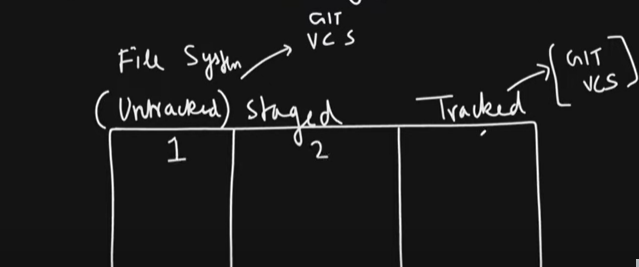
is file ko stage mey lekey aaunag aur track mey dalunga
ae ship mey jana hey yah nahi vaisa sochlo
untracked sey stage mey lana hey -
git add file namevapas untracked mey lana hey -
git rm —cached file nameab stage sey track karani hey -
git commit -m “message”git status - vo abhi tracked hey , agar mai testing.py ko delete kardunga - toh isko mai vapas restre kar saktha hun
git restore python.py
ab thak humney sikha - git init , git status , git add , git commit , git rm -cached , git restore
Ab nayi file banathey hey git-commands.txt - history commands ko copy karlo aur paster kardo
Hum abhi ae sare changes ko local sey remote github ko push karenge
Github pey jakey ek new repo create kardo - name - github-for-devops-workshop
aap ka jo local hey vo aapka personal hey , github hey world wide web pey hey - kahi sey b access kar sakthey hey , agar aapko aapkey local code hey vaha sey github ko pahunchani hey
git pushcommand sey paunchavogeygithub mey username password lagtha hey na
- mai use kartha hun , mai local ko personal access token de detah hun thaki vo merey github mey push kar detha
copy which are here push an existing repo - git remote add origin url
hey github , local ko batara hun remote dhoor mey rakhi hui ek url usko add kardo
git remote -v→ remote add hui yah nahi idhar check kartheygit push origin main - jab enter karunga - username and token mangega
aap github settings pey jakey - personal access token -create karo - token ko repo ka access dedo
git remote set-url origin https://PAT@github.com/username/repo.gitgit push origin master- push hogaya
Github mey rakhi hui repository , iskey sath ky akya kar sakthey hey , aap clone kar sakthey ho yah fork kar sakthey hey
fork - github - github hotha hey - fork karlo
clone - github to local clone hotha hey clone karlo
- mainey commands jo b naye they remote add ka vo commands.md mey likha -
git statuskiya -git addkiya -git commitkar detha hun
bina token sey connect - settings mey jakey - ssh mey - apka system ka ssh-key copy karna hey thab vo allow karega
mai direct remote mey edit kartha hun - commit kardiya github key through
jo new sey change kiya kya vo merey local mey hey ? toh ek command use karunga -
git pull origin master
Branches:
what is branches
-ae jo main master kya tha - ae branches key name hothey hey
branches kya hothey hey - tree pata hey , jaisey tree key roots rehthey hey - tree key seed lagathey hey pehley us seed sey rrrroots - roots sey - tree - trees - branches hothey hey
seed mathlab , jab git repo initally commit kiya create kiye na vo seed tha vo tha master pey - jab local mey repo banathey hey master pey rehtah hey
agar github mey create arangey na main ey rehtha hey
git branch branchname - create the branch
git checkout -b brnachname - create branch and also switch
git switch dev copy of the same desired state of code
dev mey jakey mainey create kiya ek file - add kardunga , commit kardunga
master ko paat nai dev mey kya chalra hey , dev ko pastha nahi master mey kya chalra hey
every branch in git maintains its own copy - faida - isolate , copy banalethey hey -
Branchin ki strategies rehthey hey
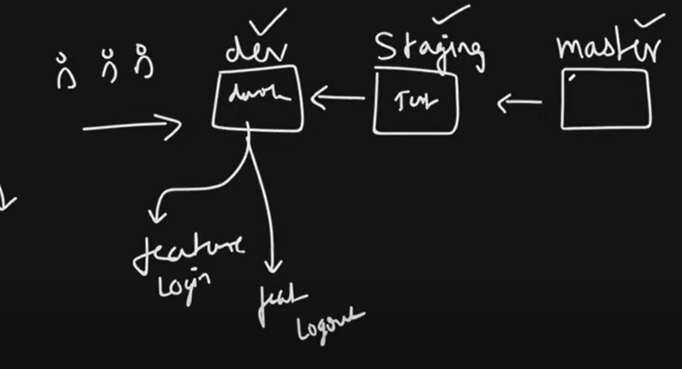
ek code rakha rehtha hey master pey
aur ek code rehtah hey stage - staging mey ky ahotha hey jo master ka code hey uat , users test kar paye
dev mey dev code rakha jatah hey sirf sur sirf development hothi hey
feauture1 , feautre2, feauture3 → dev → test (ua) → master
dev mey naya developer kuch enhancements key liye use karthey
agar aap chahthey ho ki kaha pey rakha hua hey production mey dalna hey yah nah dalna hey usey stagging mey rakha jatha hey
aur sahi vala hey , sahi sey chalra hey usko checihi math isliye vo code - master pey rehthi hey
bohot log kaam karthey right feauture pey so ek ek person vo khud branches create karlega feauture key uppar
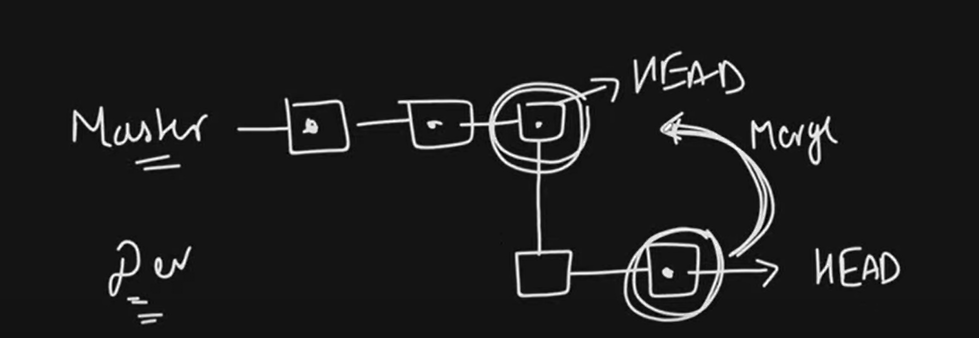
mujhey dev key changes master mey merge karna hey toh make sure your on master - and then
git merge dev
git hub key though compare and save
#if you go git tech fetch , jithney b branches remote me hey local mey aajathey
GIT HOOKS:
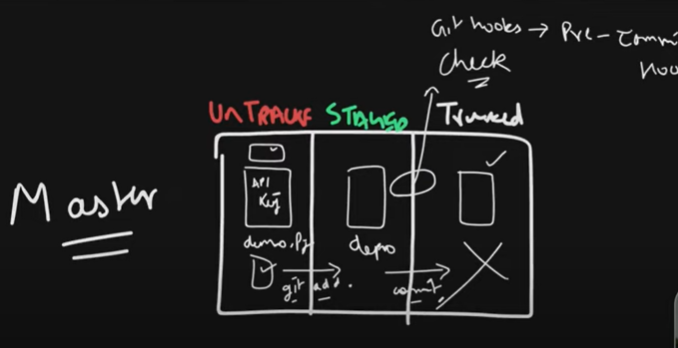
Yeh aapki branch hey master , ae daigram dekkey kya yadh aatha hey - ki untraced , stage aur tracked yadh aara , aisa samajlo ki mainey ek untracked file thi
lets say demo.py - usko mainey stage karnekey liye git add kiya , bohot saare files thi git add . kiya git commit kiya , kya vo track hojayegi
mujhko ae batao , demo.file mey mujhey galthi api-key reh gayi , kahi code mey kuch galath tha kya vo commit hogayi
galthi sey galath code b ho saktha hey , it is humar error
iska solution kya hotah hey - commit karnesey pehle badh , push karnesey pehley yah badh - kuch internal checks laga sakthey ho
aur ae jo add aur commit key beechmey aek check ho saktha hey - ae automatically check hona hey toh hooks sey hoga - pre commit hook ser agar aapkey files mey dikath hey , aur aap commit karney jathey ho - syntax wrong hey toh ae commit nahi kar detha
ab mai apney rep mey jaunga , ls -a , aur .git valey folder key andar jav - cd .git - gaye bohot dhyaan sey dekhna - ls kiya idhar hooks name ka folder dikhega
ls - pre commit , prepare-commit dikhege - bohot saare samples hey , apko actually ae name ki file banana hey →
```plaintext vim pre-commit
vs code mey jakey - search mey user.exclude - idhar .git lo delete karni hey kiun ki mujhey visible hojaye
mainey ek file banayi jiska name demo.py - jiskey andar ek mainey function banaliya
demo.py
def my_function(): a=5 b=6 c=6 test() return d my_function()
ae wrong code hey agar mai git status karun , git add and commit kardun , ideally
commit hojayega -> git ko thodi hi patah hey ae wrong code karkey
this file is now addes , thabki ae file galath file hey
mai isko pre commit hooks sey theek kar detha hun
toh python ka jo code rehtah hey usko check karnekey liye -> flake8 hotha hey code ka quality check kar saktheyy hey
pip install flake8
flake8 demo.y
is tool sey code ka quality check karliya , ae code quality test kartha hey
kya mai as a devops engineer , ae tool ko apney git key process mey daldun
commit honesey pehley ae tool chal jaye
mai kya chahtha hun , hooks mey jaunga ek file banaunga - pre-commit file
ab mai aapni sarey files ko lekey aajaunga
files=$(diff --cached --name-only --diff-filter=ACM | grep '.py$' flake8 $files
if git grep - q "password|secret_key|API_KEY' $(git diff --cached --name-only); then echo " Kiun apni job risk" exit 1 fi
ab mai pre-commit file ko executable banadunga
chmod u+x pre-commit
ab mai git status , git add . - git commit -m "commit" galath file mai commit
karney try karra hun lekin pre-commit hook commit nahi karney dega
        \- ky aap aapney office mey puri ki puri pre commits hits lagagkey purei ki puri teams ki jo bugs , they problems they ek hi minute mey solve kar sakthey , jo wrong code dalenge hi nahi toh problems ayeney hi nahi


* agar mai galthi sey password , yah api-keys hey toh mai commit nahi karney dena .


* mai demo.py mey password daldiya , ab git add . and git commit khoshish karunga toh error aajayega


# Github Actions:

* Github actions key sath aek portfolio deploy karna chahthey ho


\- ab aisa samajlo ae aapki github repo hey , jiskey andar aapkey files hey , ab ismey ek branche hey master , uskey andar kuch kuch commands hey application hey

is application ko deploy karthey ho ,isko aap build ,test , phir deploy b karthey ho right , is cheez karnekey liye jenkins use karthey hey right

ci cd pipelines banathey ho right - > ab ae jo pipelines hey jo jenkins mey banri vo aap github mey b bana sakthey ho , jisko bolthey hey github actions , github actions aek inbuilt tool hey jo aapko aapkey code ko build test deploy , scan , sonarqube , sab cheez karney detha hey

* `aapko jana hey aapkey repo mey jana hey - lets say isko scan karna hey - actions mey javo - pylint - configure - khud hi likh diya python code test key liye pylint - yaml mey rehtha hey`


aapkey repo mey .github folder rehtah hey usmey aap workflows likh sakhey hey ki - onpush , ontest, ondeploy

commit karney key badh- github workflows key bajuk small dot rehtah hey - vo actions run horey hongey

testing.py mey thoda code likhdo

/ def heloo():

“““ this is ehloo function “““

return “heloo dosto”

heloo()

tum commit karkey push karenge automatically aapkey actions start honge run karna

* jo b error aaya hey as a python epert karkey aapka file ka code and error dekey fix akrdo karkey batao aajayega aur copy karkey add and commit push kardo.


Go to aws account : - s3 → mai ek bucket banaunga - tws-portfolio - url aisa aek portfolio banaunga —> through github actions

Github pey aapka code rakha jayega code hoga html , java script aur css , java script → is code ko s3 bucket mey oaunchana hey - is bucket ko public access dekhey - public thak paunchana hey - ae sab ho automated github actions

s3 ko access karnekey liye - iam - security creds hothi hey , create kardo acess key and security key

* tws-portfolio fork karkey → uskey andar html css aur java script ka code hye

* mai ek file create karunga .github/workflows/main.yml

* * name: portfolio


```plaintext
name: portfolio
on
    push
        branches
            - main

jobs:
    build-and-deploy
        runs-on-ubuntu-latest
        steps:
            - NAME:     checkout
        uses: actions/checkout@v1

        - name: configure aws cred
           uses: aws-actions/configure-aws-credential@v1 # humko is repo key settings mey secrets and variables mey actions mey secret and access key banado

        with:
        aws-access-key-id: ${{ secrets.aws_access_key_id}}


            -
-s3 -mey jakey cukedt create karkey - s3 hosting mey index .html create karo
aur bucket policy mey jakey - gnerator policy - s3 bucket policy mey allow - bucket policy copy kareleye - bucket policy create kardo replacing with your bucket id