Docker in One Shot
Hi, I'm vaseem akram, a dedicated and passionate DevOps Engineer with extensive experience in automation, continuous integration, and infrastructure management.
Agenda:
- intoduction to Docker
Docker hotha kya hey , jabbi samajlo jabbi aapko ek cient hey , client key pass laptop hey uskey server pey deploy karna hey , mainey devolop kiya mera own machine machine its working me , but in client location its not working
docker sek template banakey image create karkey run kartha hey application on containers - jo b requirements , libraries sab ek image mey rakhey ship karthey hey is image ko kisi b computer mey chala sakthey hey
Docker ek open source tool hey
Docker aaya .cloud key company thi ae problem ai , inhoney is cheez ko containarised kardiya aur open source kar diya , docker ka janam idhar hua
2013 , publisher hey pycon , 2017 mey CNCF vaha pey ae pauchee , vaha sey bohot log use karrey
Why we use dokcer : kabhi kabhi aapkey computer mey chalri , isliye ki , kuch libarires , versions ,kuch tools isliye vo cheez chalri hey ,dusre computer mey ae cheez nahi ho isliye aapko container or vitua environment banana padtha hey , aur usi virtual environment key vajhasey dusrey computers mey b ae chez chalthi hey
kya ae docker vm jaisa rehtha hey
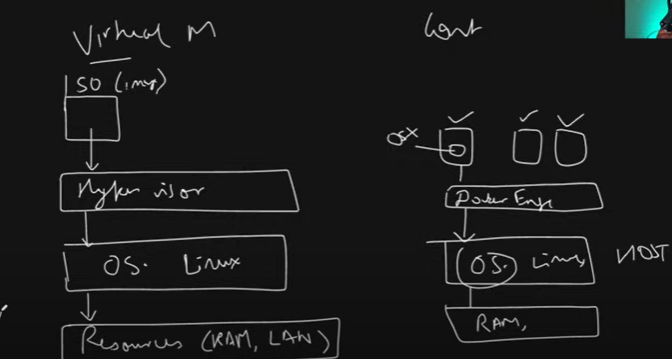
vm vs docker -
irtualization hotha hey usmey virtual machines hothey hey
containerization mey docker , container d , podman containers ho sakthey hey
jo vm hothey hey na , ae ek cheez use karthey hey hypersior , hypervisor aapkey o.s sey jagah resources allocate karletha hey uskey uppar o.s chalatha hey
vm mey khudka operating system hotha hey , vitualizatinon hotha hey bohot load hotha hey multi o.s
containerization ek tool use kartha hey docker engine - ae khud ka o.s use nahi rakhtha vo host key o.s ko use karletha hey
jo apna container bantha hey light weight bantha hey
Daigramatically :
Docker Architecture kya hey :
Docker kaisa kaam kartha hey → docker mey three important cheez hey
docker engine : dokcer application container engine iskey uppar containers chalre
docker daemon : docker d or docker daemon - ae containers ko manage karthi hey is docker d key ander aur ek cheez rehtah hey container d - ae ek tool hey
ae containers kaisa banange , kaisa instructions denge -ae docker cli key through chalthey hey vo commands docker daemon ko paunchthey hey , jo ki background process hothi hey ae cotainer dki bolthi hey bhai ae chalado ae karado akrkey
docker client: jaha key docker key jithney b cheeze heyna dekh sakthey hey , toh docker client connect kartah hey api → ko toh aisey cheexe hothey hey backend sey communicate kar sakaey , aur jo b hey dikhadega
iskey backgroup mey docker daemon and cli khel chalare hothey hey
# install docker :
sudo apt-get update -y
sudo apt-get install docker.io - docker enginer , dokcer daemon , docker cli , docker client , containerd , sab miljayega
sudo systemctl status docker
whoami - docker ps - > sudo usermod -aG docker ubuntu
newgrp docker # is command sey aapka group refresh hojayega
docker ps - # docker cli sey docker d ko command bheja containers list dikhavo karkey
docker images:
- docker images kya hotha hey
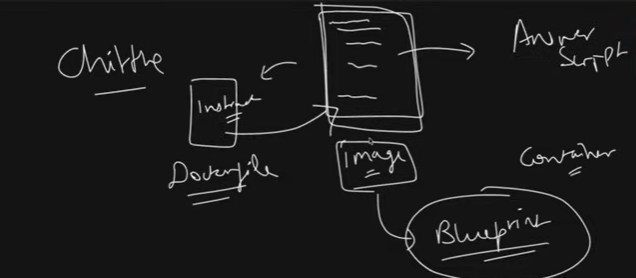
- aap kabhi school yah colleg emey kabhi chitte banayethey kya - ek paper mey chotey chotey likhey huey rehthey hey - us chethey sey apni answer script banathey ho - ithna sa chitt apass laratha hey
- ae hi chitta apkey dost ko dedo vo bhi pass hojayega
- ae jo chitta hey vo ek image hey - is image chittey sey banathey hey vo aisa samajlo containers
toh us image ko aap kahi pey b daldo - us cheez ka container bana sakthey hey right
vo image bani or likhi jathi ey dockerfile sey , bhaiyya dockerfile sey image - image sey container ban jathi hey lekin image kya hey
image aek aisa blueprint hey jismey saare steps likhey huey hey , kya aap ek application ko run karnekey liye kya kya chahiye , kaisa environment chahiye , kya kya hona chahiye us image ko directly banakey run kar sakey - its like blueprint
- docker file mey ek instsructions likhey honge , us instructions key basis pey image banthi hey , us image ko replicate kar sakthey hey kithne b containers bana saktehy hey
lets say mai hun, mainey bohot badiya sa notes banaya , us notes sey docker in one short sey ek video or ek image bangayi , aap dekhoge ho sakeytho aap key doston ko bhejogey ae conatiner hothi hey
Agar nutshell b bataun - dockerfile mey ek instructions hothey hey aplications ko jo b required cheeze - is docker file sey image banaega - docker image sey bantha hey docker container
pre-build images ko b la sakthey hey

docker login karlo - docker login sey aapko docker hub mey login karna padtha hey
account settings → PAT → Generate a new token → read write access
Login suceeded - docker hub aek aisi jagah hey - docker key public saarey images idhar rakhi hothi hey
#mujhey docker image pull karni hey kaisey oull karunag -
docker pull hello-world
docker images - list of all docker images
is image ko kya karna hey , is image sey bantha hey container
docker run hello-world
docker pull mysql # mysql ko run karneykey liye jo image bani hogi vo bhi download kardega
mysql ek server hotha hey login honekey liye usernname pasword dena padtha hey
docker run -e MYSQ_ROOT_PASSWORD=root mysql
docker ps - mysql ka container chalra hoga 0 is container ka b lifecycle hotah hey → chalrahey , chalrahoga , rukh jayega , phir wapas sey restart , phir kill hojayega .
docker stop conatinet_id → vo container ko rok dega
agar mujhey background mey chalana hey toh -d = detached mode mey use karo
Mainey jo b pull kiya vo publically available image ley , lets say merey pass ek java ka project hey
us java ka projetc ka conatiner mujhey banana hey iskey liye mujhey dockerfile likhni hogi - chala dockerfile banathey ho
shubham loundhe - simple-java-clone it - as a devops engineer aapko pata chalna hey ki is java ko run karnekey liye dockerfile likhni aani chahiyevim Dockerfile
  # pulla  abase images whcih gives all required tools and libraries
  FROM openjdk:17-jdk-alphine

  # create a folder where the app code will be stored
  WORKDIR /app
  # copy the source code form your host machine to conatiner
  COPY . .
  COPY src/Main.java /app/Main.java
  # Compine the application code
  RUN javac src/Main.java
  # Run the application code
  CMD ["java" , "Main"]
Docker file hotha kya hey , aisa samajlo kuch instructions hothey hey us instricions key vajaheysey aapka applicaton run hoga
instrictions kya hotah hey us key andar - application code , libraries , jo o.s use akrni hey uskey bharemey , frmework , tools , packages ae sab rehni chahiye
ae box ko bananey key liye dockerfile mey istructions dena hey
kabhi maggie banaye - maggie banaye instructions rehthey hey right
step1. kadai , step2. pani step3. masala, step4.maggie step5. gas - to build recipe for maggir , agar tum ae recipe dedi vo us recipe sey maggie banayega
ae java application run karna hey , java , mujhey first ek environment hona hey aur uskey andar java honi hey
Base image: FROM openjdk:- > image tag kya hotha hey - image ka version hotha hey
issey ek environment miljatha hey
mujhey ab working directory banana hey , workdir container mey folder bantha hey uskey andar merey application code copy karunag
RUN javac main.java #mujhey agar koi file or command run karni hey mai RUN command use kartha hun
Jabbi aap ek line likhthey hey - jabb ek image banthi hey har ek line ek layer hothi hey jissey vo image hori hey
ae jo intermeditae container ko liye lines hothey hey
jo cmd hotha hey ek special command hotha hey aapka conatiner bun aye us container ko run karnekey liye - CMD use karthey hey
pani oiney straw chahiye right - vaisa hi cmd - command container run karne use akrthey hey
so ae command nahi likhog tabhi container banega , agar container likhre ho container banneykey badh execute hojayega
is comamnd ko overwride kar sakthey ho - while running the octainer
is ka b bada bhai hey - ENTRYPOINT - entry point overwride nahi ho saktha - ae aisey command hey intermediate container bananey nahi hotha - container mey command inject hoyega
docker build -t java-app . location - steps are layers - ab aapki java name ki image ban gayi
docker run java-app
clone python project - flask-app-ecs → app.py file kuch toh code hey api’s detha hey
    git clone url
    vim Dockerfile

    FROM Python:3.7

    WORKDIR /app

    COPY . .

    RUN pip install -r requirements.txt

    ENTRYPOINT "python","run.py"
- docker build -t flask-app .
docker run -p 80:80 flask-app
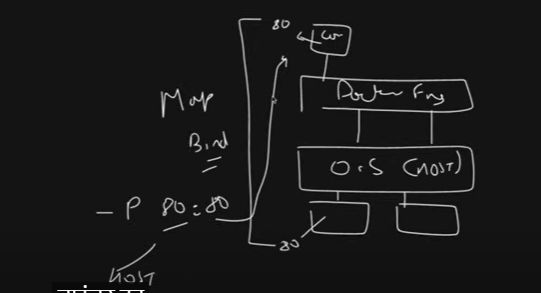
jaisa mainey aapko baytaya ae aapka o.s (host) hey iskey pass resources hothey hey jo docker engine share karletha hey aur containers ko chalaletha hey jo container key andar app chalra hey port number 80 sey chalra hey aur appka 0.s ka port dono ko bind karana padtha hey
us cheez key liye publish kara na pastha hey -p host:container port
is aapko background mey chalana hey background mey run kardo -d
docker run -d -p 80:80 flask-app
docker ps - karkey dekhunga mera app chalra hey yah nahi
port enable karni chahiye dekhnekey liye - publically open karna padtha hey
agar aapko lagra hey aapka app time lera hey toh logs check kar sakthey hey docker key andar kya chalra hey -
docker logs container_idhar bar loga vala command chalana padra - aisa kuch hey kya ki aapka container atatch hojaye is screen per ki ssarey logs realtime dekh pau -
docker attach cont_idaap cont stop kar sakthey hey -
docker stop cont_idjaisa aapne stop kiya vaisa hi start kar sakthey hey -
docker start cont_idaapka mysql b chalra , kya mysql ka data base hey uskey andar ghuskey access kar saktah hun ? - > yes →
docker exec -it cont_id bashmysql -u root -p rootshow databases;create database devops;exit
docker ps - running containers dikhthey hey
docker images - aapkey pass jithney b images vo dikhthey hey
mujhey ubuntu chalana hey - aisa container chalana hey hamesha running mey ho mac mey ubuntu chalana hey
docker run -itd ubuntu
Docker Networking :
Docker ki networling kya hotha hey
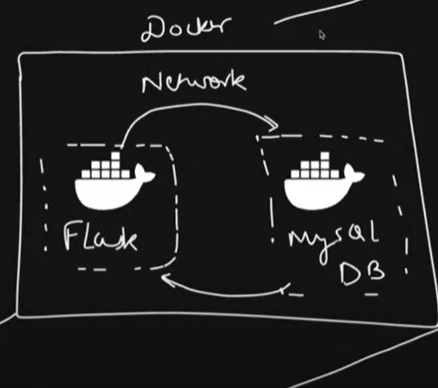
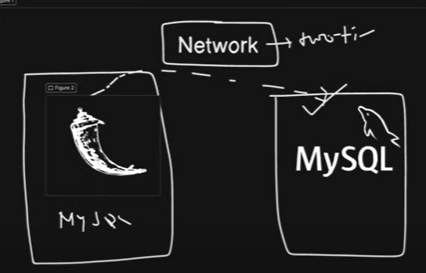
lets say aapka aek computer hey is computer mey ek docker ka conatiner chalra hey , aapkey pass aur ek docker container chalra ek flask app aur mysql ka container hey - ae flask app ka container hey ek isolated , aur vo b isolated - ae flask mysql sey bath nai kar saktha , mysql flask sey bath nahi kar saktha
agar aapko in dono key beechmey communication karwwani hey toh aapko ek network chahiye hoga
isliye aathey hey concept aapka docker networks
docker networks 7 prakar key hothey hey
Host network - ki aapki docker ocnt netwrok hey aur aapkey host machine ki network hey vo same rahega
- toh aapka port number 80 host mey chalra hey aur aapne docker network mey host dala hua hey docker cont ka b port number 80 chalega
default bridge : jaisey aapka ae cont hey aapka ae host hey - , is host sey is cont pey network bananey key liye aapko ek pull bandna padthey hey - by default dethey hey
user defined brige (custom_bridge): khudna network create kar sakthey hye
None: matlab is docker conainer mey koi netwrok nahi , na ussey koi bath kar skathey hey , na vo kisi sey bath kar skatha hey , completely isolated , na inetrnet chahiye container ko ae netwrok ded-
macvlan : macvlan basically mac address , 2 mac address pey communicate kar saktha hey - jab docker swarm cluster rehtah hey thab use kar sakthey
ipvlan
overlay
- ae jo b 7 hey isko drivers bolthey hey
ae jo last three ja docker swarm cluster rehtah hey thab use karthey hey
docker swarm kya hotah hey , abhi is laptop pey docker cont banaye - agar 50 las mey docker ocntainer pey banavo aur uso sabko ek sath chalav
cluste boltheyhey , aajkal kubernates use karthey hey uskey liye ae last three use karthey hey
frst 4 humko important hey
kaisey padthey hey docker network - docker network ls
abhi three network aapkey samney hey
- docker network create mynetwork -d bridge
iska use hoga ek project mey- jab hum two tier ka project karenge thab - samjo ek flask aap and mysql conatienr chlara - ae jo flask app hey ae ek docker cont hey aur mysql b - ab dono jo docker conatiner independently chalre mujhey koi problem nahi aari - agar merko is dono ko communicate karani hey toh use karthey hey docker networks
#connection of two tier application
go to github - clone two tier flasp app- clone it
ab is app mey app.py , kya ae application kissi data base ko connect kartha hey - > ismey likha hua configure my sql from environment variables - jo envi ronment variales hey pass karna padtha hey ae application run karwanekey liye
docker run -e → issey environment pass karthey hey
vim Dockerfrile
  FROM python:3.9-slim

  WORKDIR /app
  RUN apt-get update\
      && apt-get upgrade -y \
      && apt-get install -y gcc default-libmysqlclient-dev pkg-conf

  COPY requiremnets.txt

  RUN pip install mysqlclient
  RUN pip install --no-cache-dir -r requirements.txt

  COPY . .

  CMD ["python","app.py"]
docker build -t two-tier-backend .
jo mysql hey already usiko hi utilise karlunga
kya kya variable pass karna app.py mey dekhlunga
docker run -d -e MYSQL_HOST=mysql -e MYSQL_USER=root -e MYSQL_PASSWORD=root -e MYSQL_DB=devops -p 5000:5000 two-tier-backend:latestdocker ps -a- simple nahi dikhara matlab exit hogaya karkeydocker logs cont_id- logs check kareykiun chalra nahi matlab - is flask network mey mysql ka cont hi mil hi nahi raha
docker stop mysql_id & docker rm cont_idmai ab ek mysql cont banaunga ussey pehle ek network create karlunga - two-tier drive hey bridge
ae network dono containers ko dedunga
docker run -d --name mysql --network two-tier -e MYSQL_ROOT_PASSWORD=root -e MYSQL_DATABASE=devops mysql
docker run -d --network two-tier -e MYSQL_HOST=mysql -e MYSQL_USER=root -e MYSQL_PASSWORD=root -e MYSQL_DB=devops -p 5000:5000 two-tier-backend:latest
docker ps - two-tier-backend flask , mysql both are running if i check logs = > docker logs cont_id
docker network ls - ae jo create kiys → docker network inspect cont_id - dono ekhi network toh dono bath kar skathey hey ek sey ek
ab enable kardo 5000 port public to access
docker exec -it mysql_contid bash
mysql -u root -p root
shwo databases;
use devops;
select * from messages;
Docker volume and storage:
ae jo hum log dekha data base mey data stored hey ae aara application sey - agar aap mey data dalenge toh db mey reflect hora
agar mainey database valey container ko mysql cont ko restrt kardiya kya hoga
docker restart mysql-contid
docker stop and start refresh hoga - agar mai jakey sql cont mai ab jakey dekhunga toh jo data previously tha vo hey abhi bhi
agar mai restart ki jagah container ko delete kardun toh - docker stop cont_id & docker rm cont-id
docker ka same container vapas run kartha hun - jab mai isko refresh kartha hun saara data ja chuka hoga delete ho chuka hoga
ab ae ek problem hey , ae docker volume and storage -→ae kya hotah hey ae aek tariqa hotah hey docker key through jithey b containers hey uska data persist kara saktha hun
jissey ki galthi sey delete hojai , restrt , stop and start karey mera data persist rahey
to for ex - ae aapka mysql is ae jo cont iskey andar ssara data hey , agar cont delete hoga toh cont delete hoga
iska jo data hey usko bind karlethey hey apney host key sath ,apney host hotah hey filesystem hotha hey , usmey ek path folder banalethey hey cont key data key sath , vo jo hotha hey concept bolthey hey volume
aur is cheez ka command hothah eyy -v or docker volume
docker volume ls → karunana jo b volumes hey dikh jathi hey
mai khudki volume kaisa create karunga - aap docker volume create mysql-data
ab ae jo volume hey ae kounsey jagah pey rahegi - docker inspect myvolname - ae /var/kib/docker/volumes/mysql-data/_data
ab mujhey apney container ko is path key sath bind karna hey - > mysql cont abhi key liye delete kardunga & docker rm cont_id
ae jo mysql -vol dithi mai mysql-cont sey bind kardunga
docker run -d --name mysql --v mysql-data:/var/lib/mysql -network two-tier -e MYSQL_ROOT_PASSWORD=root -e MYSQL_DATABASE=devops mysqlmysql ka data stored in /var/lib/mysql
jo b data mai flaskapp sey banauga vo data delete nahi hoga
docker stop cont_id docker rm cont_id -→ ab mai isko delete kardunga toh ky mera mysql ka data b udega
docker volume inspect myvol
sudo su —> cd path = ist ther emy saara data secured hey ,- mai same volume say sam container create karunga
dokcer restart flask_app_id —> as it is stored .
# data persist ka aur ek tarika hey kya -→ aap kya karko bahar aajav - ek volume name ka folder banado - cd volumes→ mysql —> ab aap aap key two-tier flask app mey jakey - docker container ka rehtha ha mysql vala - docker stop mysql & docker rm mysql
#VOLUMES 2 TYPES KEY HOTHEY HEY
1. named based volume:
- path volume
mysql
cd volumes →mysql → saara data backup
agar mai dokcer run mey -v rakhey jo b folder create kiya agar vo folder path dedunga toh b container chalega - isko bolthey path based volume
- you can save your data with docker volumes.
Docker Compose:
abhi mainey bohot saara manuall kaam karra hun like , mai baar baar ek two tier flask app mey jatha hun , docker ps kartha hun , agar docker conatiner ko delete karna hey , docker stop or docker rm - > manually karra hun
- as a devops engineer manually nahi karna , automate karna hey
docker compose automate karnemey bohot help kartah hey
docker compose mey ek configuration file rehtha hey vo aapko bohot madad kar sakthi hey
yet another markup language - > jaha pey key:value pey cheezey pass kardethey -
ab docker compose naame kiun diya , ek aur ek sey zyada containers create karney mey help kartha hey
jo b hum log ney abhi thak kiya docker build ,docker run , docker network , docker volume ae sab aek hi sath mey file sey kar deta hey
docker compose mey multiple docker containers bana sakthey ho, simple ka funda , bananey ka tarika hey combination of build , run , network volumes
docker compose ka version “3.8” - ae syntax ka version hey
aur aap services daloget - i mean kithney containers karkey bata sakthey hey
iskey badh docker build use karthey hey na image lekey -idhar direct image lethey hey - image:→phir environmnet kuch dena hey idhar dey sakthey hey
phir volumes - mysql-data:/var/lib/mysql
networks karrethey - two-tier
port - “3306”:”3306
abhi flask na image sey nahi hotha , build sey hotha hey - aur iskey liye context lagtha hey - context hey docker file kaha rakhi hui
phir container_name:, ports: “5000”:”5000” , ab environments use kartha hey jo flask environments mey jo chahiye vo , phir networks, vo
- volumes : jo create kiye uskey name daldo , networks: iska network ka name b daldo
 version: "3.8"

services:
  mysql:
    user: "${UID}:${GID}"
    image: mysql:5.7
    container_name: mysql
    environment:
      MYSQL_ROOT_PASSWORD: root
      MYSQL_DATABASE: devops
      MYSQL_USER: root
      MYSQL_PASSWORD: root
    volumes:
      - ./mysql-data:/var/lib/mysql
      - ./message.sql:/docker-entrypoint-initdb.d/message.sql
    networks:
      - two-tier
    restart: always
    healthcheck:
      test: ["CMD", "mysqladmin", "ping", "-h", "localhost", "-uroot", "-proot"]
      interval: 10s
      timeout: 5s
      retries: 5
      start_period: 60s

  flask:
    build:
        context: .

    container_name: flask-app
    ports:
      - "5000:5000"
    environment:
      MYSQL_HOST: mysql
      MYSQL_USER: root
      MYSQL_PASSWORD: root
      MYSQL_DB: devops
    depends_on:
      - mysql
    networks:
      - two-tier
    restart: always
    healthcheck:
      test: ["CMD-SHELL", "curl -f http://localhost:5000/health || exit 1"]
      interval: 10s
      timeout: 5s
      retries: 5
      start_period: 30s


volumes:
    mysql-data
networks:
  two-tier:
is tarah sey aapney badiyasa - docker file banaya → aapko is system mey docker compose ko install karna padega
sudo apt-get install docker-compose-v2
docker compose up
idhar mey dekho , yaha pey problem , mysql abhi thak bana nahi hey , two-tier flask container mysql sey pehley hi bangaya hey ae toh gadbad hey , ctrl c gracefully stop kardo
ab mai vim docker-compose.yml → ae jo mera flask vala container hey → depends-on : -mysql , jab thak mysql banjatha jab thak mera flask vala banna nahi chahiye .
docker compose up - kehra hey , abhi bhi khera , usney mysql ka container pehley hi bana diya , start kardiya ,entry point bandiya jaisi bangaya usney two tier ko start kar diya , problem kaha aathi hey pata hey , mysql ka pehley ban jatha hey , uskey two-tier flask bantha hey but mysql ka container accept kartha na ready for connections vo badh mey kartha hey , matab jab thak mysql sahi tarikey sey ready nahi hojatha thab tha usko pura ready nahi bol sakthey
isliye aapko ek cheez lagthi hey usko bolthey hey health check , docker compose mey mysql container key sath healthchecks: dalna padthey hey - ismey test key commands dal sakthey hey
ki fro ex: gara mysql mey mai ping kartha hun localhost ko apney passwords key sath , jab thak local host ka ping nahi hotha , thab thak vo retray kartah rahey 5s and 10s once
vaisa hi flaskapp mey b health checks dal sakthey hey
agar aapka health check pass nahi huye restart:kardo always
har baar restart karo jab thak test checks pass nahi hojathey , aur health check baar baar 10s interval mey 5 baar retry karthey raho - ab isko run karthey hey .
just a single command container up hojayega , ab mai detached mode mey run karunga - docker ps
This is how docker compose works.
Docker Registry :
Aisa samjo ae jo docker images hey - tow-tier flask or saare images local pey hye , isko kisi server or kisi repository or registry mey store karna hey jaisa ki docker hub , is image ko properly tag karna padega push karna padega ,
docker system prune:jithne b aapkey system unsed volumes , betworks , containers , dangling images sab delete kar detha heydocker images - docker rmi -f image_idmultiple images and containers hey toh mai - -> docker images -aq → docker rmi -f $(docker images -aq)
- docker compose down - containers delete stop kar detha hey aur remove kar detha hey
docker registry - jaisey mainey bataya - two-tier flask image hey local mey , merko is image ko repo mey paunchau -jo ki dokcer hub ki repo - docker login -u -p passwor
ab humko image ko tag karna hey , image tag ka matlab - jo purani latest image hey usko rename kar sakthey hey - agar aapko local pey image store karna hey normal name kaafi hey
agar aapko docker hub pey image rakhni ,, aapka jo b username hey vo us imge name key pehle aani chhaiye
docker image tag two-tier-flask:latest vasee143/two-tier-flask:latest
docker push vasee143/two-tier-flask:latest → ae local sey docker mey mera image pus karra hey
mulsti-stage Docker builds
docker images - karkey dekho ae jo image hey - jo humney banaya tha
flask app -ecs ka us image jab b humne build kiya python 3.7 base image utata hey - vo bohot badi image hothi hey , jo mera final image bantha hey na - vo b badi image bankey aatah hey
jab b mera application bohot bada hojayega 0 jab image ka size bada hojayega ae concern hey , problem hey
dokcer images - ae 1.1GB ki hey - ae multi stage docker kya karega aapki image ko stages mey distribute kar detha
aapki image banthi hey - dockerfile sey - uskaimage 1gb - uski ocntainer b bada hotha hey
ek baar aapkey dockerfile mey kya kya cheeze rehthey dekhthey hey
mujhey is size ki reduce karna hey toh merey dokcerfile mey base image hi badi hothi hey toh mai isko reduce kar saktha hun
kabhi kabhi full base images , libraries install karnekey liye jaroori hothi hey
sirf libraries key liye jaroori hothi hey run karnekey liye nahi
# stage1 base image 994mb
FROM python:3.7 AS builder
WORKDIR /app
COPY requirements.txt .
RUN pip install -r requirements.txt
#----
#stage 2 base image 400mb
FROM python:3.7-slim
WORKDIR /app
COPY --from=builder  /usr/local//lib/python3.7/site-packages/ /usr/local/
  /lib/python3.7
COPY . .
ENTRYPOINT ["python","run.py"]
ae jo base image hey - isko aek alias name dey detha hun → ae sir libraries and packeges build hogi is stage sey - mai nayi stage banaunga uska base image - vo chothi base image use karunga
slim vali jiski size kam rehthi hey sirf run karney key liye
aur wrokdir create karo stage 2 ka - aur packages ko copy karlo from stage 1 then copy karlo code phir run kardo
docker build -t flask-app-mini .Humney multi stage build sey 1.gb sey 140 mb thak compress kardiye - that is the power of caching and multistage build hey.
Monitoring and logging in docker
toh jaisey apney kiya docker ps - lets sey aapka container chalana hey toh jo humney mini appp banya na usko hi run karkey dekhthey hey
docker run -d -p 80:80 flask-app-mini
ip:80 - this should run - lets say isko debug karna hey
docker logs cont_id - logs dikhege idhar , aap chaho aur ek cheez kar sakthey hey ,
jithney b logs hey ek file mey redirect kar sakthey hey - nohup - kisi b commands ko background mey run arkey file mey store kar detha hey
nohup docker attach cont_id &
ls
cat nohup.out - aap loga collect kar paarey ho
mai jo b karunga ip:80/thanos - ae servers key logs and monitors kar sakthey hey
Jis tarah sey docker containers mey maza aatha hey kubernatest mey b aatah hey
Orchestrating docker with kubernates (Introduction)
Toh sabsey pehley samjo k8s kya hotha hey - aap docker padthey padhey aapko patah chala ae conecpts hey karkey
docker hum log directly production mey use nahi karthey - kiunki jaisey abhi mainey kiya docker ps - simple sey mai docker stop kardunga na downtime hojayega - agar docker rm kardunga uska data application delete hojayega
docker containers crash honekey chances zyada hotha hey - production mey isiliye hum conts ko individually nahi chalathey production mey
isliye containers ko orchestrate karthey hey
-Kubernates aek orchetsration tool hey jo docker cont ko manage kartah ehy
ek docker cont kill hogaya , crash hogaya toh dusra container up hojaye
agar ek docker cont bohot storage and ram zyada lera hey , us storage and ram ko allocate kardo memory jissey ki kuch limits mey hi container chale
jab amazon use karrey hey - jab big billion saley hotah hey - thab bohot zyada load hotah hey - agar crash hojatah ehy thab auto jheal kar detha hey - agar load zyada load aatah hey k8s scale kar detha hey based on criteria , background mey containers hi chalre hothey hey , bus is tarah sey chalre hotey hi uskey pass auto scaling aur auto healing capaticy sey chalre hothey hey
Kubernates mey kuch cheeze hothey hey like
pods: pods aisa hothey hey ek unit hey iskey andar containers run hothey honge , ek aur multiple pods b run hothey hondey
agar merko der saare pods chahiye (collection of pods(replicas chahiye) humko deployment chahiye - ae jo deployment rehthi hey frontend , backend , data base ki alag banathey hey - un deployments ko ek dusre sey bath karnekey liye network jo chahiye hotha hey aap service sey dethey ho - (connect the deployments to the users)-
ingress - usmey b routing karni hey ingressuse karna padtha hey
Projects:
project1: 3 Tier Application with Docker Compose
project2: Deploying a web application with Nginx and mysql
PROJECT2:
Dosto agar project ki bath karey nginx with mysql - nginx ae industry standard reverse proxy tool hey
now we are gonna pair up nginx and mysql
project hey - web app hey (django mey likhey hey ) vo nginx ser server hoga - djnango ka backend hey - vo data base sey connect hoga mysql ka
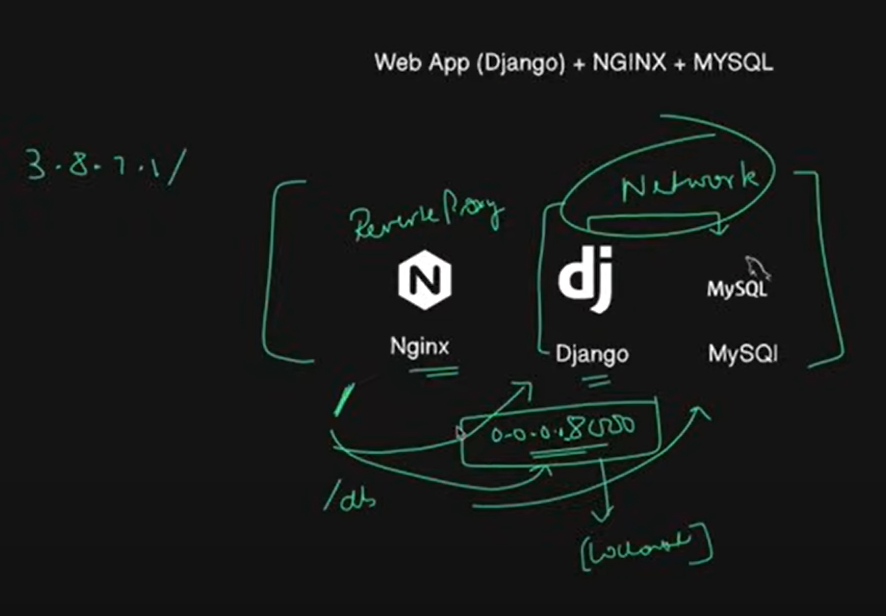
aapko anana hoga -django , django ka application , vo connetc hoga mysql database sey ae pure application sever hoga nginx sey
ae b kind of three conatiners use karney vala hey
nginx cont , django cont , aur mysql cont
ae mysql cont hey ae djnago cont though bat karega ismey b network lagana padtah hey
nginx hotahhey , django or web applications hothey hey vo port pey chlathey hey , ab 800 key andar aur b andar routing chalri ho , vo routing internally route hojai externally port number dena na padey isliye ek reverse proxy server hota hey
proxy matlab aap unko ek proxy pass dedo agar aaka url localhost:8000 aaya , agar aapka url localhost/app or localhost/home aaya tohi internally yaha redirect kardo
mainey apney website mey dala - ip/ daldiya nginx sever key routing mey aisa likha hoga agar / hey django pey redirect kardey agar /db hey mysql ko redirect kardey
go to github - django-notes-app - ae jo aap hey - is appko hum end to end build karenge
clone karlo - ismey kya kya cheeze hey samajthey hey
ismey my notes hey ae frontend hey - frontend hey ae already build bani hui files hey - iska jo important hey backend hey (notesapp( backend hey jo django mey likha hua hey
settings.py ae jo file rehthi hey sab configuration rehthi hey
templates key andar mynotes/build - ae frontend key html css import karleha hey
aur database connectivity environmrnts diyi hui hey
humko .env file b banani padthi hey , jaha sey database ko connect karnekey liye jo jo env chahiye vo idhar dey rakhey hey
directly pass kar sakthey hey yah env file mey b rakh sakthey hey
samaj mey aagaya na mynotes - fronend , notesapp -backend , nginx name ka folder jaha pey nginx conf rakhi hui hey
  upstream django{
      server django_app:8000;
  }

  server {
      listen 80;

      server_name localhost;

      location / {
          proxy_pass http://django_cont:8000;
          proxy_set_header Host $host;
          proxy_set_header X-Real-IP $remote_addr;
          proxy_set_header X-Forwarded-For $proxy_add_x_forwarded_for;
          proxy_set_header X-Forwarded-Proto $scheme;
      }
  }
ki agar is server pey port number 80 pey kahi pey http django container uska port 8000 url aathi hey vo / ko redirect kardega
agar mai instance ki ip:/ lagadun then ae redirct karega internal django product mey
clone hogaya - iski docker file dekhlenge
FROM python:3.9

WORKDIR /app/backend

COPY requirements.txt /app/backend
RUN apt-get update \
    && apt-get upgrade -y \
    && apt-get install -y gcc default-libmysqlclient-dev pkg-config \
    && rm -rf /var/lib/apt/lists/*


# Install app dependencies
RUN pip install mysqlclient
RUN pip install --no-cache-dir -r requirements.txt

COPY . /app/backend

EXPOSE 8000
#RUN python manage.py migrate
#RUN python manage.py makemigrations
docker build -t noted-app .
mujhey three container banana hey -
- vim docker-compose.yml
version: "3.8"
services:
    nginx:
        build:
            context: ./nginx
        container_name: nginx
        ports:
            - "80:80"
        networks:
            - notes-app
        restart: always
        depends_on:
            - django


    db:
        name: mysql
        image: mysql
        ports:
            -p "3306:3306"
        environments:
            MYSQL_ROOT_PASSWORD: root
            MYSQL_DATABASE: test_db
        volumes:
            ./mysql-data:/var/lib/mysql
        networks:
            notes-app
        restart: always

         healthcheck:
            test: ["CMD", "mysqladmin","ping","-h","localhost","-uroot","-proot"]
            interval: 10s
            timeout: 5s
            retries: 5
            start_period: 60s


    django:
         build:
            context: .
         container_name: django_cont
         command: sh -c " python manage.py migrate --no-input && gunicorn  notes.wsgi --bind 0.0.0.0:8000"

         ports:
            -p "8000:8000"

         env_file:
            - ".env"
         restart: always
         depends_on:
            - db

          healthcheck:
            test: ["CMD-SHELL","curl -f http://localhost:8000/admin || exit 1"]
            interval: 10s
            timeout: 5s
            retries: 5
            start_period: 60s


volumes:
    mysql-data
networks:
    notes-app
cd nginx/ cat Dockerfile , default file hey isko kaisey likhthey hey →go to google → nginx default config file - begginers guide - here you see the document
ab - dockerfile mey dekho
FROM nginx:1.23-alpine
COPY ./default.conf /etc/nginx/conf.d/default.conf
ab docker compose mey nginx ka likhdo , ab django mysql pey depend kartha hey toh pehle mysql likhdo
idhar django ka cont_name important kiunki cont_name humne default.conf mey mention ki hui hey
gunicorn ae aisa ek tool hotha hey jo aapkey aaplication ko server kartha hey production mey , toh gunicorn ek wsgi ek file rethi hey jo apney application ko server kartha hey
djangi k application hotha hey na , jab b vo mysql sey connect hoha hey na migrate karna padtha hey isliye command rehtha hey
ab docker compose up
ab sab issues fix kiya i hope it will work now - docker compose up —build -ae kiun pata hey by default ae cache ko letha hey isliye phir sey build karney key liye —build detheyhey ae like —no-cache
— ja thak mysql container dhang sey chalega thab thak django nahi chalega
jo health check mainey mysql key liye kiya vahi health check django key liye karun
docker compose up —build → docker ps -a
docker network create notes-app -d bridge
docker compose up —build
Three tier application with docker compose java app
→ GO TO Expense tracker → pehley ae project key bharemey dekhenge
ab samjo three tier application ka matlab kya hotah hey , ek hotha hey frontend -jo thyme leaf name ki framework hey - thymeleaf name ki ek frontend hey uspey aapka ui banahua hey
jo aapka bckend hey springboot hey ek java ka framework backend
jo data base hey mysql - pey data base hey
backend hey ae build hotha hey maven sey - maven ek build tool hey apache foundation banaya hey
apey ko docker compose chahiye ismey ae three containers banare honge
thymeleaf & springboot - ki ae do b ek application mey combine kar sakthey hey
jo maven key through build hojayega - base image rahega maven ka - phir maven ki base image mey soringbook java build karenge
aek mysql db lenge connect karneka khoshish karenge
ab thodasa dekhenge is project key bhareme →
src → developer ka kaam - yaha pey kuch test cases hey , main mey resources hey → assets - jo landing pages , css
application.properties ae important part hey
application ka name: expensesapp, spring.database: jdbc:mysql://mysql:3306/expenses_tracker , username= , password=
ae vo configurations hey ajo aapkey springboot app mey hey , springboot configuration hey vo kuch kuch variables aur uski corresponding values ko mangthi hey - vahi values mysql pey makesure karna hey ki aap derey ho
ab humko pom.xml important hey - aapkey application hey kounsey kounsey dependencies use kartha hey
Clone the code from shubham - > https://github.com/LondheShubham153/Expenses-Tracker-WebApp.git
pehley dockerfile and docker-compose.yml ko remove karo scratch sey banayenge
# stage 1 - Build the jar (Java application Runtime)
FROM maven:3.8.3-openjdk-17 AS builder
# Working directory
WORKDIR /app
COPY . .
RUN mvn clean install  -DskipTests=true

#Stage 2 - execute the Jar File from the above stage

FROM openjdk:17-alpine

COPY --from=builder /app/target/*.jar /app/target/expenseapp.jar

CMD ["java","-jar"."/app/target/expenseapp.jar"]
docker build -t expenseapp .
vim dokcer-compose.yml
```dockerfile version: "3.8"
services: java-app: build: context: . container_name: "expensesapp" networks:
- expenses-app-nw ports:
"8080:8080"
environment: SPRING_DATASOURCE_USERNAME: root SPRING_DATASOURCE_URL: "jdbc:mysql://mysql:3306/expenses_tracker?allowPublicKeyRetrieval=true&useSSL=false" SPRING_DATASOURCE_PASSWORD: Test@123 depends_on:
- mysql_db restart: always healthcheck: test ["CMD-SHELL" , "curl -f http://localhost:8080 || exit 1"] interval: 10s timeout: 5s retries: 5 start_period:60s
mysql_db: image: mysql container_name: "mysql" networks:
- expenses-app-nw environment: MYSQL_ROOT_PASSWORD: Test@123 MYSQL_DATABASE: "expenses_tracker" restart: always ports:
- "3306:3306" healthcheck: test ["CMD" , "mysqladmin","ping","-h","localhost","-uroot","-pTest@123"] interval: 10s timeout: 5s retries: 5 start_period:60s volumes:
- ./mysql-data:/var/lib/mysql nginx: build: context: ./nginx container_name: nginx_cont ports:
- "80:80" networks:
- expenses-app-nw restart: always depends_on:
java-appand
networks: expenses-app-nw:
```
- docker compose up
networks mey mapping agar deyaga toh - nahi rehna chahiye ; colon rehna hey
docker compose up —build
enable the port number in aws 8080
cp -r ../django-notes-app/nginx .
vim /nginx/default.conf -→ replace container name here and port number 8080
upstream server expensesapp 8080
copy nginx code from django naotes
and paste it here and docker compose up —build
why permission denied ari mysql-data ki → aapka jo volume hey created nahi hey
docker volume create java-app-data → ab apna docker compose.yml file mey replace kardo java-app-data
SSL B BATADO - take your ip address and go to go-daddy .com - create one profile and purchase one domain.
phir jakey us domain ka na dns mapping hotha hey -→ ab mai dns mapping mey ae ip address ispey ma kardo karkey -→ manage dns mey - aek record banado - add new record - docker name - option mey A record , Arecord subdomain hotha hey - > docker.trainwithshubham.com → value mey ip daldo aur ttl - custom seconds 600 and save it
ae domain name nginx → default.conf mey daldo → phir A record delete karkey phirsey create kardo aur
- docker compose up —build and now check it will be working.
Docker scout
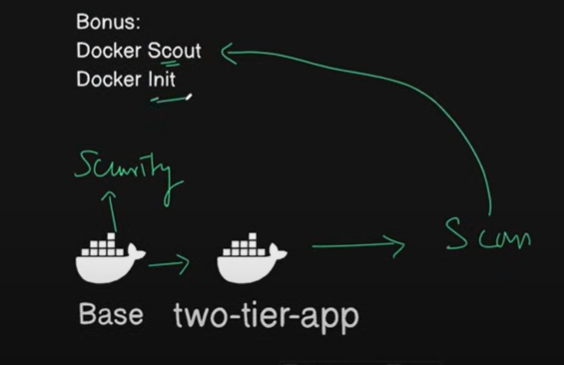
jabbi aap docker ki images banahey ho - lets say aap docker ki image banali - aap ney two-tier flask ki image banali
ae image aek bse image sey bani - ae python ki or kisi ki b ho sakthi hey right , aisa b ho saktha hey ae base image mey kuch security related threats , security related issues , vulnerabilities ho , isiliye image ko humne security key liye scan karthey hey
bhaiyya ae scan trivy b kartah hey , trivy ka kaam image , scanning , file system scanning k a
similarly usi prakar sey docker ney khud ka b image scanning tool banaya hey docker scout
aapko bohot aasan sey dockerdesktop mey hotha hey
desktop mey jakey - aapkey pass jithney b images hey docker scout scan kar saktha hey - dekh saktha hey ki kahi uski base image sey yah complete images ser kahi threat vulnerabilities hey kya karkey
ae issues kya hey kaisa pata chalega
terminal mey javo uskey liye - docker images
docker scout quickview imagename- ae pehley dockerhub sey authentic karega aur scan karkey diyegaaur depth mey janna hey -
docker scout dves imagename
Docker init:
AE sa samajlo ki aapko dockerfile banani hey - dockecompose banai hey k readme banai hey kithna time lagtha hey
docker file mey kya kya likhtey hey
- from , workdir , copy , run , cmd , author , label , maintainer
but ae jo kaam manually karna padtha hey
docker init kya kartha hey aapko ek ready made template bana detha ehy
mujhey just docker init karna hey - aur select karna hey aur click akrna hey
docker ignore bana detha hey , dockerfile , composefile , readme b bana detha hey - project select karlo
use version also - enter - relative directory of main landing package → .
port - 8080 ,
within few seconds - dockerfile , docker compose and sab files banayega .