Kubernates Basic to Advance
Kubernates
Google ney 2014 mey google key websites scale nai ho parey - system robust nahi tha , vo ek time key badh crash hojarithi
2014 mey un honey ek system banaya borg jithney b applications hey vo automatic heal , scaleup and inhoney kubernates ka initial name borg tha phir ae opensource kar diya
Kubernates ia as orchestration tool hey , aapkey jo docker containers rehthey hey ae saare docker containers ek dusrey sey bathey karthey hey , kab kisko heal hona hey , scale hona hey ae sab kubernates karatha hey
CNCF is an organization , its a community
Kubernates kiun use karthey hey - jo bohot saarey applications monolithic banthey they ab microservice use karrey
Monolithic and microservice.
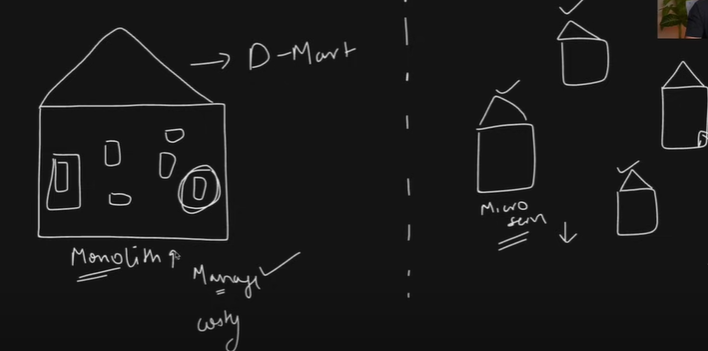
Monolithic - > sambo ek dmart hey - badi si dukhan hey sab miljayega sab kuch ek hi jagah miljayega , monolith ek bada application ek hi application mey saari ek hi repo mey daley hey , is mey problem 1. manage karna difficult hey - stoc mey ek service ghadbad hogai - pura ka pura application shutdown hojatha hey - socho ek thodi ki cheez update karna hey toh saara application update karna padtha hey , manage karna bohot difficult hey
solution is Microservice- chotey chotey store- multiple stores like micro services - badey application ko chotey chotey services ko divide kar diya -
microservices ko manage karna easy hey - chotey services docker key through chala sakthey hey - docker key through chali hui service ko manage and orchestrate karna hey aap kubernates use kar sakthey hey .
aap ko pata chalna hey ki aap kiun sikhre - kiunki microservice architecture bohot zyada use karrey isliye
Kubernates Architecture:
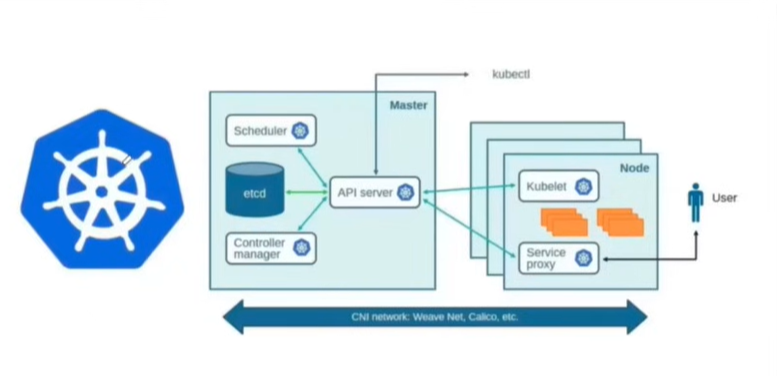
Kubernates ka logo kiun wheel jaisa - ship ka captain steering wheel hey na ae kubernates chalatha hey
aap kisi company mey jatha hey - startup matlab docker container - na scale kar patha hey - kabhi chaltha hey kabhi down hojatha hey
samjo mnc - mnc ka kuch architecture hotha hey - kubernates ka jo architecture hotha hey usmey aek aisa server rehtha hey - jo bakhi servers ko manage kartha hey
Cluster k8s mey hum cluster pey kaam karthey hey - multiple node ho sakthey hey - ek node hey master - dusrey nodes hey - worker nodes
mnc sey pov mey dekho - uska jo headquarter hey kahi dhoor rehthea hey - headquarter newyork - yaha pey actual kaam nahi hotha hey , vaha pey manager ceo log baidthey hey
india mey pune 1 node , banglore node , noida node ae node pey actuall log jakey work karthey hey
kubernates mey b aisa ek architecture rehtha hey - ek master node rehtha hey jaha pey ek aisey services hey jo worker node pey kaam karvaney key liye baiti hui hey - worker node mey actually docker key container chalre honge ae chalva rahehey vo master node pey baitey huey rehthey hey
master node mey kuch services rehthey hey
apiserver: jo purey workernode mey kya kya cheeze chalri hey , master node mey kya kya cheeze chalre hey vo ek info rakhtha hey like Team lead - aapka team lead kahi dhoor bairta rehtha hey mumbai yah phir delhi vaha hey aapkey manager yah aapko kaam batata rehtah hey - api server ek aisa unit service hey jo communicate gateway rehtha hey har ek component key sath , aapkey team lead bola ki hamara requirement hey ek devops person ki jo ,placement karwatah hey vo HR - SCHEDULAR
* schedular: ek aisi service hey schedular aapkey containers ko woker node pey scheduler karwathi hey , ab hr ney toh opening nikaldhi aapko job lagwadi , aapka jo data rahega ki aapney kab vo pod create kiya , kab opening hui kab job mili ae saara data base rehtha hey us db ko kubernates mey bola jatha hey - etcd
* etcd: ae ek db hey - jo b cluster mey chalra sab data information etcd mey rehtha hey - data store rehtha hey , ab ek vo rehtha hey na pura ka pura bada sa head manager - dekhtha hey ki merey sare location mey kaam hora hey yah nahi hamra project manager
* Controll manager : dekhtha hey sab saarey achesey chalre yah nahi - vaisey controll manager rehtah ehy - ae dekhtha hey ki , pods, services, nodes, cluster sahis ey chalra yah nahi dekhtha rehtha hey
Worker node jaha pey actual mey kaam chalra hoga udhar mey b kuch services rehthey hey like udhar b manager rehtha hey
kubelet: jo ensure kartah hey aap aarey yah nahi , aap task karreho yah nahi , sahi sey login karra, sahi sey task submit karra yah nahi , kubelet apiserver ko bata tha hey - api sever controll manager ko bata hey aur db mey save kartha hey , pods isolate rehtha hey usko access nahi karsakthey hey , ek proxy rehtha hey idhar ka udhar chulbuli kartha hey
service or kube proxy: as a user api server ko bolkey , kubelet ko bolkey andar key pods ko access kar sakthey hey
CNI network : master to worker node communication chalatha hey
kubetcl - director ceo - aisa karo vaisa karo karkey bata tha hey
aapkey k8s ko instructions dena hey , dikhav kithey node chlarehey kithne pods chalre - pure key pure cluster ko aadesh dey sakthey hey
pod: pod is a smallet unit in kubernates in which dokcer containers will be running , pod to pod communicate we make through service
Setup On Local:
Kubernates Installation in various types
kubeadm
Miniqube
KIND Cluster
Eks/Aks/Gke
Rancher - enterprice , Civo - ae sab like aws - enterprice ka hey
t1.medium lelo - connect karo - kind cluster - google karlo - or Kubestarter repo mey Kind-cluster mey jakey copy karkey install kardo
cluster create karey kind mey yaml likhna padtha hey - yaml - after configuring yaml
kind create cluster —name=tws-cluster —config=config.yml
kubectl cluster-info --context kind-tws-cluster
kithney nodes hey -
kubectl get nodes --context kind-was-cluster
create a folder called miniqube: and install the miniqube
how to change kubectl set context default in kind
kubectl config use-context kind-tws-clusterkubectl get nodes
- Kubeadm : Agar aapko kubeadm . bare metal aapko agar k8s cluster banana ho
aap ek master banakey multiple nodes ko join kara sakthey hey
ek master node pey kubeadm init hoga jaha pey b kubernates initialize hotha hey vo hojathe hey master node phir aap jithney b nodes chahiye aap join kar sakthey ey - ae jo worker nodes join hothey hey 6443 port number pey join hothey hey
- Now kubeadm has been installed
Aapko ek docker ka container ko chalathey ho ek pod mey - ek pod mey ek sey yah zyada containers chalathey hey
kubernates mey aap autosale , autoheal is cheez chalney key liye deployment chahiye
is deployment ko bahari duniya ko access devoge - isliye service ki zaroori hothi hey jab service banthi hey jabhi as a user aap access karavoge
aekhi cluster pey nginx , mysql b chalra hey toh confussion hotha hoga na kaisey in cheezon ko manage karsakey
jaisa whatsup mey group hotha hey like , family group , friends group isi tarah sey k8s mey b groups hothey hey jismey us group key related jithne b resources hey like pod , deployment , service - us group ko bolthey hey namespcae (ns)
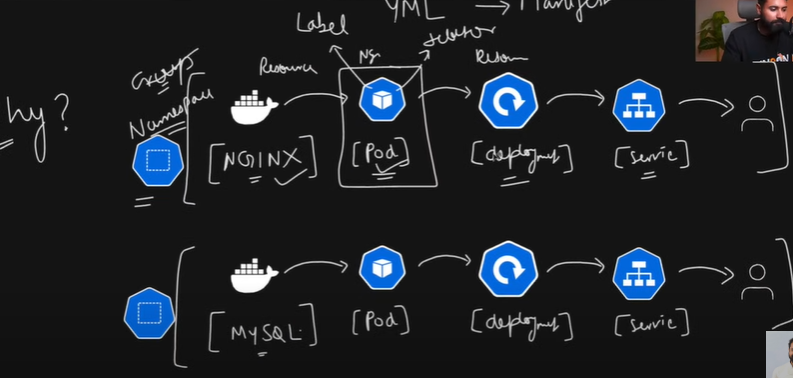
Namespace: ae ek unit hey us particular namespace mey jithney b resources hey us group mey rehthey hey - ek group key resources aur ek group key resources ko disturb nahi karthey , complete isolation jaisa ki aapko manage karnemey easy rahega
cd kind-cluster
kubectl get namespace (or) kubectl get ns- agar aapney koi b name space nahi diyetoh ae by default namespace mey jatha heykubectl get pods- jo default ns usmey kuch b pods nahi heykubectl get pods -n kube-system- cluster key pods is namespace mey rehthey heyisliye kubernates mey bohot sarey applications chala sakthey hey alag alag namespace sey
kubectl create ns nginx- to create the namespacekubectl run nginx --image=nginx→ is used to run the pods inside the pod nginx container will be runninggalthi sey aapka pod hey default mey create hoga - aap pod ko delete ko b delete hosakta hey
kubectl delete pod nginx
kubectl run nginx --image=nginx -n nginxkubectl get pods -n nginxis tarikhey sey pods - namespaces create kar sakthey - aap ae saari cheeze vi yaml banayenge - isko manifest file bolthey hey - aap jo chahthey hey manifest mey banado vahi run hothey hey
kubectl pod delete nginx
kubectl delete ns nginx
namespcace: jaisa humne kind cluster diya is ka b kind namespace , version api ka v1 , ab jo info deni heyna vo rehthi hey metadata object mey rehthi hey , metadata mey name: nginx
- kubectl apply -f namespace.yml - isko apney apiserver pey lekey jav aur create kardo , jab aap apply karthey ho thab aapka object ban jatha hey
pod.yml : kind pod rahega , apiVersion: v1 rahega , aur info metadata mey name: nginx-pod , ae pod kisi group or kisi namespace mey create karna chahtha hun - namespace: nginx iska spec google mey k8s pod - aur aapko yaha mey pod yaml milthey hey , spec mey containers bana sakthey hey usmey containers bana sakthey hey ek aur ek sey zyada usko name banana padtha hey , spec: name: nginx , image : nginx:latest ,ports: - containerPort: 80 - ae banigai manifest pod
kubectl apply -f pod.yml -→ kubectl get pods -n namespace
nginx container mey kaisa ghusey -→ kubectl exec -it pod nginx-pod -n nginx -- bash
curl 127.0.0.1 -→ aapka nginx chalra aap browser mey chalayetoh maza aatha hey
ae pod dhang sey chalra yah nahi - kubectl describe pod/nginx-pod -n nginx -→ aapkey pod key sath kya kya hua ae sab bata detha hey
is pod banana khasiyath nahi hey is pod ko scalable banana toh deployment lagega
deployment: kind : deployment , aur apiVersion: apps/v1 - google k8s deployment - ismey aapko manifest rahega - apiVersions differ rehthey hey harrek service key liye apiVersion alag rehtha hey phir metadata rahega , name: nginx-deployment , namespace: nginx -→ spec:
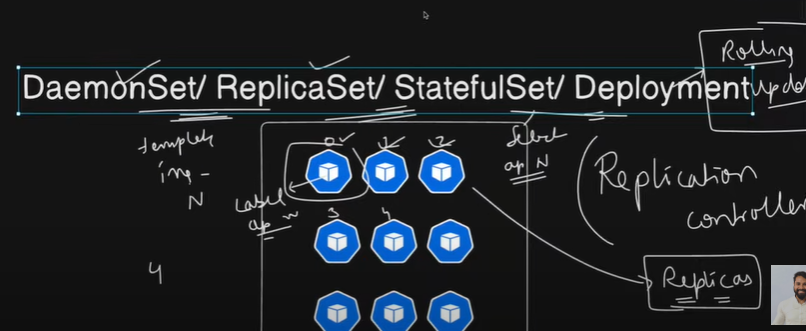
deployment kiun chahiye - autoheal , scalable karna hey thab deployment ki jaruri rehthi hey replicas - ae replica banakey dega Replicaset/statefulset/deploymentset
- deployment: Replication controller - ek pod ko pura traffic nahi dey sakthey vo crash hojayega -aap uska replica banathey hey - replica controller pod key replicas ko manage kartha hey like clone
deployment aur replica same rehtha hey - ae aapko ek feauture detha hey rollingUpdate - without downtime rolling update one by one it makes down the pod and update the pod
ae jo mera pod hey - is pod mey jo nginx chalra heyna uskey 2 replica chahiye - toh deployment ko pod pehchan mey aana chahiye -isiliye is pod ko label dena chahiye , us pod ko select karnekey liye selectors b chahiye - pod ka label and deployment ka selector criteria match hojai toh usko replica kardo
kubectl apply -f deployment.ymlkubectl delete -f pod.ymlkubectl scale deploymeny/nginx-deployment -n nginx —replicas=5kubectl scale deploymeny/nginx-deployment -n nginx —replicas=1kubectl set image deployment/nginx-deployment -n nginx nginx=nginx:1.27.1
kubectl rollout deployment/nginx-deployment -n nginx set image=nginx:1.27.3
rolling update karthey karthey error b aagaya aapkey saare pods pey error nahi aayega kuch pods run horey hongey kuch pods update horey honge sequenctially
rollingupdate kiunn karthey hey suppose merko v1 key pods hey - isko latest version v2 sey update karna hey thab deployment without downtime isko rollback kardega , replicaset mey na sab kuch delete kar detha phir update kartha hey
kubectl delete -f deployment.ymlcp deployment.yml replicaset.yml- 2. ReplicaSet : agar aapney bola hey ae pod ki temple image use karni hey nginx ki replica honi hey 4 , 4 pods banjayenge lekin ismey jab roling update mey downtime aatha hey -
kubectl apply -f replicaset.yml
replica mey rollout -→ roleback nahi karsakthey
kubectl get replicasets -n nginx
replicaset using the same deployment technology - deployment is far advanced .
- Statefulset : har ek pod kabhi bhi create / delete hosakthi hey satateful set kya bolthi hey harrek pod ko numbering dedunga 1 , 2 ,3 4 - har ek pod ki state by number sequence mey maintain rahegi
4..daemonset: ae jo pods hey -n nginx ae kisko miley hey aapkey pass 3 workers hey
kubectl get pods -o wide -→ ae pods kispey assign hue - worker 3 mey nahi mil paye
deamon sets ensure karthey hey jithney b aapkey node hey atleast usmey ek pod toh chalthey rahey -
kubectl apply -f daemonset.yml
kubectl get pods -n nginx
kuectl get pods -o wide - daemonset worker1 pey ek pod , worker2 pey 2 , worker3 - 1 ensure kartha hey .
- saare ek kaam hi karthey hey - relication control hi karthey hey
daemonset ka kaam hotha hey har ek node mey atleast ek (replica)pod run kartha hey
replicaset - jithey b aap boley uthey replicas maintain kartha hey
satefulset : ka kaam jithey replica ho vo apney sath ek state maintain karthey chale
deployment- jithne b replica hey , rolling update , scaling , auto healing karthey rahey
4.Jobs& CronJobs
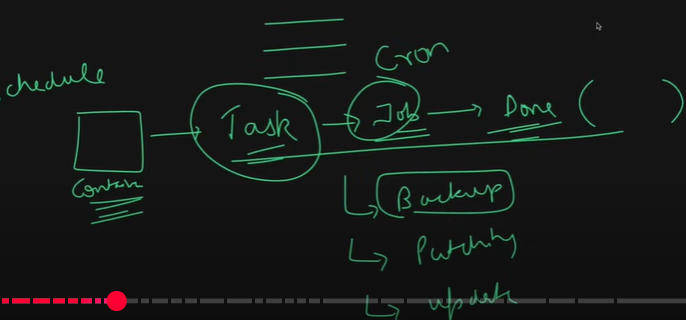
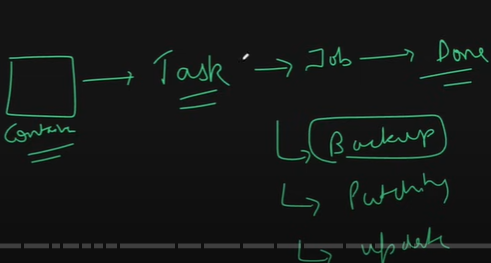
jobs: aapko ek container sey ek single task karana hey - aap nahi chalthey vo cheez as a sever chalthi rahey forex: tws as a sever chaltha hi rehtha hey , aap chahthey ho ek hi job hey vo chaley aur khatham hojaye
like it can be comething like - paching , system update , backup ,, or creating directory
vim job.yml → ab jo aap banaraheho vo single chalega yah batches mey chalega - like single thread
aaya backup liya khatham
or ae jo task hey parallel li chalado three pods same task pey toot padey hey
spec important completism: 1 parralelism: 1 agar 2 rakhdunga toh same task 2 pods create hokey job run hongey
busybox ek image rehtha hey is ka kaam sirf commands chalane ka rehtha hey
kubectl apply -f jobs.yml
kubectl get pods -n nginx → status completed → ae job chala vusney 10s hello dst print kiya aur khatham kiya
pod ki b life cycle rehtha hey - state kya rehtha hey - sabsey pehle container creating , running , terminating , phir completed, imgpullbackoff, errpullimg
kubectl logs pod/demo-job-qqrkh -n nginx
mai job ko phirsey run karsakta hun
kubectl delete -f jobs.yml → job ko delete karkey phirsey create karna padega
Cron: ae jo task hey ae particular schedule pey chale toh is job ko bola jatha hey cron job
a task that you can schedule ki vo pod chaltha rahega create hotha rahega chaltha rahega but complete tabhi hoga tha vo scedule thabhi complete hoga
vi cron.yml
volumes - ae aapka pod hey uskey andar ek container chalra hey - ae aapka host hey device ae container ae device iskey beech mey data ko persist karana chathey ho kiunki data loss na hojay toh isliye volume bana dethey ho aur us volume ko container sey mount kara dethey hey
kubectl get pods -n nginx
kubectl logds pod/minute-backup -n nginx
cd nginx
1. vi namespace.yml

kind: Namespace
apiVersion: v1
metadata:
  name: nginx

2. vim pod.yml

kind: Pod
apiVersion: v1
metadata:
  name: nginx-pod
  namespace: nginx
spec:
  containers:
  - name: nginx
    image: nginx:latest
    ports:
    - containerPort: 80

3. deployment.yml

kind: Deployment
apiVersion: apps/v1
metadata:
  name: nginx-deployment
  namespace: nginx
spec:
  replicas: 2
  selector:
    matchLabels:
      app: nginx

  template:
    metadata:
      name: nginx-dep-pod
      labels:
        app: nginx

    spec:
      containers:
      - name: nginx
        image: nginx:latest
        ports:
        - containerPort: 80

4. replicaset
kind: ReplicaSet
apiVersion: apps/v1
metadata:
  name: nginx-replicasets
  namespace: nginx
spec:
  replicas: 2
  selector:
    matchLabels:
      app: nginx

  template:
    metadata:
      name: nginx-rep-pod
      labels:
        app: nginx

    spec:
      containers:
      - name: nginx
        image: nginx:latest
        ports:
        - containerPort: 80

5. daemonset.yml

kind: DaemonSet
apiVersion: apps/v1
metadata:
  name: nginx-daemonsets
  namespace: nginx
spec:
  selector:
    matchLabels:
      app: nginx

  template:
    metadata:
      name: nginx-dmn-pod
      labels:
        app: nginx

    spec:
      containers:
      - name: nginx
        image: nginx:latest
        ports:
        - containerPort: 80

5. job.yml
  kind: Job
apiVersion: batch/v1
metadata:
  name: demo-job
  namespace: nginx
spec:
  completions: 1
  parallelism: 1
  template:
    metadata:
      name: demo-job-pod
      labels:
        app: batch-task
    spec:
      containers:
      - name: batch-container
        image: busybox:latest
        command: ["sh", "-c" ,"echo Hello Dosto! && sleep 10"]
      restartPolicy: Never

vi cron.yml

kind: CronJob
apiVersion: batch/v1
metadata:
  name: minute-backup
  namespace: nginx

spec:
  schedule: "* * * * *"
  jobTemplate:
    spec:
      template:
        metadata:
          name: minute-backup
          labels:
            app: minute-backup

        spec:
          containers:
          - name: backup-container
            image: busybox
            command:
            - sh
            - -c
            - >
              echo "Backup Started" ;
              mkdir -p /backups &&
              mkdir -p /demo-data &&
              cp -r /demo-data /backups &&
              echo "Backup Completed" ;
            volumeMounts:
              - name: data-volume
                mountPath: /demo-data
              - name: backup-volume
                mountPath: /backups
          restartPolicy: OnFailure
          volumes:
            - name: data-volume
              hostPath:
                path: /demo-data
                type: DirectoryOrCreate
            - name: backup-volume
              hostPath:
                path: /backups
                type: DirectoryOrCreate
STORAGE:
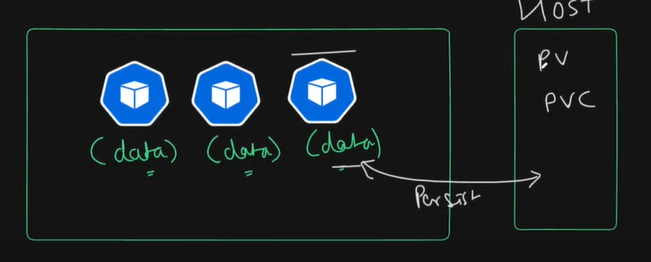
jab hum logoney cron job banyatha ae volumes aur volume mounts kuch toh kiya
samjo jab b aap ek pod banathey ho - vo pod aek server aur ek node pey chalra hotha right , ae pod kabhi bhi delte or destry kuch b ho saktha hey
is pod key andar ka jo b data hoga uska kya karoge agar vo delete hojayetoh
replication boltha hey desired state auto heal artha hey vo jo containers delete hua vo data b chalgaya
aapko aapkey pods ka data ko persist karna padtha hey - persist karaneykey liye aapko host key sath bind (persist) karna padtha hey
us cheez key liye persistent volume and persistent volume claim zaroori hothi hey ae hey kya
aisa samjo ae aapka host machine hey ec2 or docker iskey andar kuch storage hey in 30 gb mey sey kuch kuch section allocate karna chahtha hun 1GB allocate karna chahtha hun mainey 1GB ka persistent volume banaya
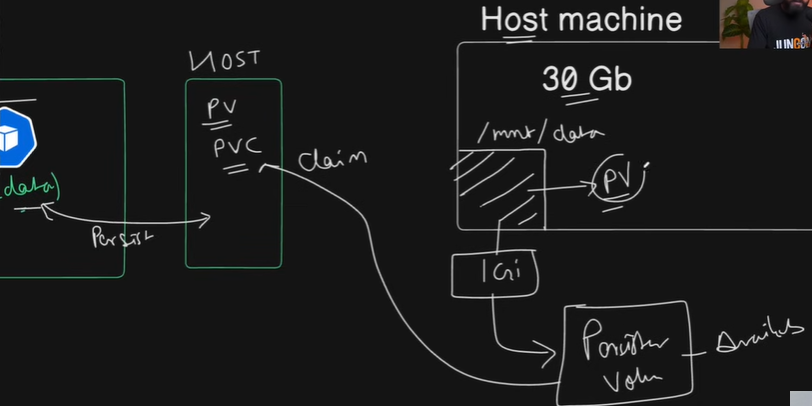
vim persistentvolu.yml - mainey kind: PersistentVolume liya , apiVersion:v1 liya aur metadata : name:local-v , labels: app: local ismey mainey spec diya - ae p.v iska capacity kithna chahiye - storage :1Gi; accessModes: ReadWriteOnce , mai chahtha hun ki agar mainey delete b kardiya ae jo volume hey host machine mey ae retain kardo → persistentVolumeReclainPolicy: Retain ; storageClassName: local-storage ; hostPath: path: /mnt/data
mai nahi chatha ae sirf aur sirf nginx namespcae may aajaye
kubectl -f apply persistentvol.yml - ae banahua hey available hey isko claim karna padega
vi persistentvolume.yml

kind: PersistentVolume
apiVersion: v1
metadata:
  name: local-pv
  namespace: nginx
  labels:
    app: local
spec:
  capacity:
    storage: 1Gi
  accessModes:
    - ReadWriteOnce
  persistentVolumeReclaimPolicy: Retain
  storageClassName: local-storage
  hostPath:
    path: /mnt/data
aap ae sipper lekey aagaye kiska hey pata nahi lets say mera hey agar mai claim karunga toh vo mera hey
sirf volume banadiye available hey isko claim karna padtha hey
kind: PersistentVolumeClaim
apiVersion: v1
metadata:
  name: local-pvc
  namespace: nginx
spec:
  accessModes:
    - ReadWriteOnce
  resources:
    requests:
      storage: 1Gi
  storageClassName: local-storage
kubectl get ns
kubectl get pv
kubectl apply -f pvclaim.yml
mai ek gb request karrahun mai apney persistent volume sey 1gb request karra hun
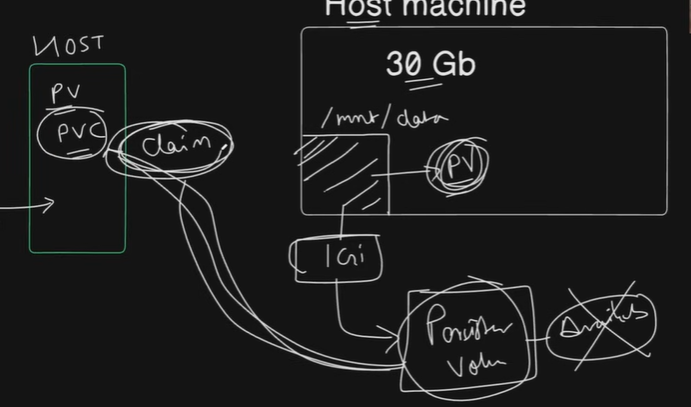
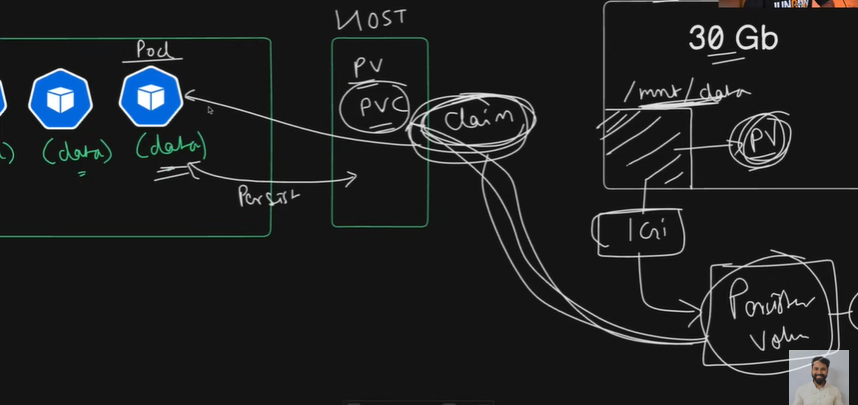
ab jo pv available tha vo bound hojaya hey pvclain sey , ab ae jo pod mey data delete ho jaratha ab mai kya chhatha hun ae mera pod host machine mey /mnt/data mey apna data bachakey rakhey - toh mainey 1gb ka pv banaya aur us 1gb ka claim banaya ab mai is claim ko ae mai is pod ko dedunga
kubectl get deployment -n nginx -→ kubectl delete deploymentyml
mujehy aisi deployment banana hey jiska data delte na ho kaisa banaunga ae jo container hey usko mai olunga volumeMounts iskey andar jo nginx ka data mount path : /var/www/html vo mount rahey name: my-volume key sath mount rahey ab jo meri volumes hey container key bahar rehtha name hey : my-volume
c
- is ka jo volume persistentvolumeclaim: claimName: local-pvc
kind: Deployment
apiVersion: apps/v1
metadata:
  name: nginx-deployment
  namespace: nginx
spec:
  replicas: 2
  selector:
    matchLabels:
      app: nginx

  template:
    metadata:
      name: nginx-dep-pod
      labels:
        app: nginx

    spec:
      containers:
      - name: nginx
        image: nginx:latest
        ports:
        - containerPort: 80
        resources:
          requests:
            cpu: 100m
            memory: 128Mi
          limits:
            cpu: 200m
            memory: 256Mi
        volumeMounts:
          - mountPath: /usr/share/nginx/html
            name: my-volume
      volumes:
        - name: my-volume
          persistentVolumeClaim:
            claimName: local-p
vc
kubectl apply -f deployment.yml
kubectl get pv -n nginx
kubectl decribe pod/pod-name -n nginx
kubectl get pods -n nginx -o wide
kubectl get nodes -ae node hey cont
docker ps → docker exec -it cont_id bash → cd /mnt/data/ ls - mainey kuc create nahi kiya
ae deployment bahari duniya ko dikhani hey toh iskey liye service ki zarori hothi hey service lagtha hey - service redirect kar detha hey
ae service bohot saare deployments mey redirect kara dethi hey
service: kind service rahega , api version rahega v1 aur metadata rahega name and namespace aur spec mey vahapey selctors dena padega aapko ae service kiskey liye expose karni hey , jiska b label app:nginx hey uska expose karunga
kaha pey karunga tcp protocal - port - baharki duniya mey kounsi port sey expose karna chahthey ho - targetPort :cont port hey
- services key alag alag types rehtey hey
type: clutser ip , node-port , loadbalancer , external ip , headless service
agar mai cluster ip kar detha hun aapki cluster hey vo nikal key aatha hey aur uskey andar ek port assign ho jatha hey aur usko aap port map kar sakthey
agar mai nodeport likhdun - aapkey purey node ka port likalna padtha hey like 30000 sey bathis hazzar thak
loadbalancer generally cloud services key liye use karthey hey
aur external ip rehthi hey vo ek external ip usmey aapkp koi aur ip address static ip dalkey laga sakthey hey
headless: generally stateful sets key sath use hothi hey
vim service.yml

kind: Service
apiVersion: v1
metadata:
  name: nginx-service
  namespace: nginx
spec:
  selector:
    app: nginx
  ports:
    - protocol: TCP
      port: 80
      targetPort: 80
  type: ClusterIP
mera nginx service bahar ki duniya ka port number 80 aur andar ka cluster ka port pod ka port number sey map kardega , for anything that has app:nginx
kubectl apply -f service.ymlagar mai apney browser pey jau - ip :80 nahi access karpayega actually chalna chahiye
nahi chalra kiunki - aapka cluster hey vo ek docker container hey , toh docker container ka port forward karna padtha hey , address ip address expose karna padtha hey
sudo -E kubectl port-forward service/nginx-service -n nginx 80:80 --address=0.0.0.0
ab access kardo - aek chotasa example lelethey hey - laundheshubham notes-app dev branch - isko mai kubernates project banani hey
git clone https://github.com/LondheShubham153/django-notes-app.git
- pehle docker image banaletha hun - >docker build -t notes-app-k8s .ab ae jo meri image hey ae locally nahi chalney vali isko dockerhub mey pahunchana chahiye isliye docker hub ka login chahiye isliye mai dockerhub mey login karlunga - toh mai docker hub mey token bana detha hun
docker image tag notes-app-k8s:latest vaseem143/notes-app-k8s:latestdocker push vaseem143/notes-app-k8s:latestcd k8s → vim deployment.yml
  kind: Deployment
  apiVersion: apps/v1
  metadata:
    name: notes-app-deployment
    namespace: notes-app
  spec:
    replicas: 1
    selector:
      matchLabels:
        app: notes-app

    template:
      metadata:
        name: notes-app
        labels:
          app: notes-app

      spec:
        containers:
        - name: notes-app
          image: vaseem143/notes-app-k8s:latest
          ports:
          - containerPort: 8000

  vi service.yml

  kind: Service
  apiVersion: v1
  metadata:
    name: notes-app-service
    namespace: notes-app
  spec:
    selector:
      app: notes-app
    ports:
      - protocol: TCP
        port: 8000
        targetPort: 8000
    type: ClusterIP
kubectl get pods -n notes-app
kubectl port-forward service/notes-app-service -n notes-app 8000:8000 --address=0.0.0.0
aisa samja agar mai /app - ae app khuley agar mai /nginx karey nginx khuley - toh aisa toh aisa khuley
- mai chahtha hun ki redirect karey services ko b
Ingress
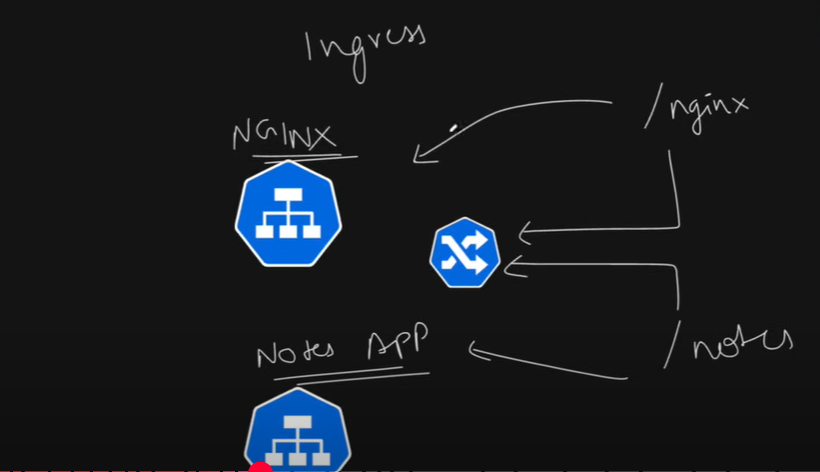
- iskey liye aapko ek cheez use karni padthi hey ingress - ingress aapka traffic re -routing kartha hey is cheex ko bolthey hey ingress
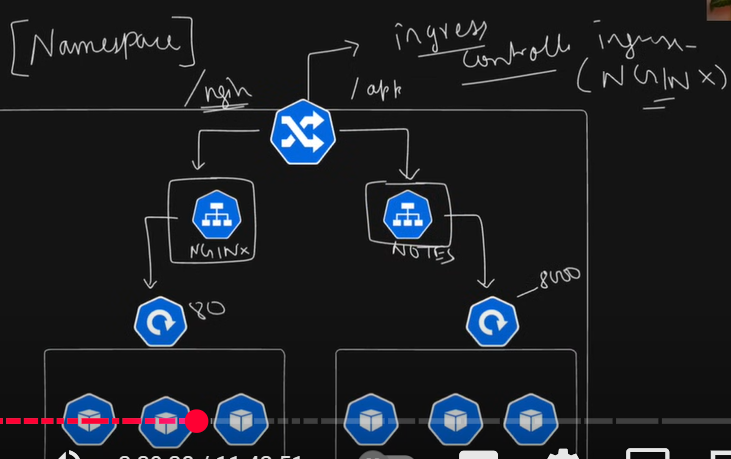
ek high level diagram sey dekhetoh ae aapka cluster hey ismey bohot saare pods hey - ae pods manage horey ek deploymen sey - aur is deployment ko access karnekey liye ek service ki zaroorath padthi hey iskey liye aap service create kardiye aisa hi alag deployment service aur 2 hey
multiple services ko kaisa route karna hey iskey liye ingress use hotha hey
toh ingress jo hotha hey basically ek service hothi hey it allows us to manage service and traffic
agar mai /nginx/ karegetoh nginx jana agar mai /app kareth notes appp redirect honi hey in saarey cheezkon ko mai ek hi namespace mey chalana chahtha hun
service ko b - so delete kardo deployment and svc ko edit karkey namespace phir sey create karo
mere pass ninx ki and notes-app ki service b hey - mai ae jo daigram banana chahtha hey vo bangayi chalo isko redirect kar wathey hey
aap jo ingress karrehono isko ingress conroller lagtha hey jo aapko cluster level pey routing karwaney mey help kartha hey - nginx controller aur b controllers hey
k8s ingress controller - load balancing and redirecting mey b help kartha hey
aapko kind cluster document mey jakey ingress click karo
cd /home/ubuntu/kubernates-in-one-short - ab mai kubectl apply -f nginx-ingress apply karunga -→ kubectl apply -f https://kind.sigs.k8s.io/examples/ingress/deploy-ingress-nginx - ek ingress controllers services banaey honge
kubectl get ns
kubectl get pods -n ingress-nginx
similarly aapko services b karni hey get → kubectl get svc - isi service ko badh mey expose karna padega
ab mai apney nginx mey jakey ek nayi file banaunga - ingress.yml
apiVersion: networking.k8s.io/v1
kind: Ingress
metadata:
  name: nginx-notes-ingress
  namespace: nginx
  annotations:
       nginx.ingress.kubernates.io/rewrite-target: / # usmey jo / hey usko rewrite karna hey rewrite
               # rewrite karkey /nginx kardo
spec:
  rules:
  - http:
      paths:
      - pathType: Prefix
        path: /nginx # jab b ae path nginx ai redirect kardo
        backend:
          service:
            name: nginx-service # redirect kardo nginx-service per
            port:
              number: 80 # service ka port hey
      - pathType: Prefix
        path: / # jab b mai bolum / app redirect to notes-app-service
        backend:
          service:
            name: notes-app-service
            port:
              number: 8000
kubectl apply -f ingress.ymlkubectl get ing -n nginxkubectl get all -n nginx-→ ae jo ingress hey ae ek ingress controller key sath chalra hey jo ingress nginx name ka controller hey jo kind cluster mey install kiye usko expose karna heykubectl get svc -n ingress-nginxsudo -E kubectl port-forward service/ingress-nginx-controller -n ingress-nginx 8080:80 --address=0.0.0.0ab mai ip:8080 - ismey nginx chalra aur / pey aur /nginx - nginx b port 80 i mean / mey chalega agar mai /nginx sey karun mera nginx open huey isliye annotations matlab extra information
ingress ki specifications ko customize kar sakthey ho
kubectl apply -f ingress.ymlsudo -E kubectl port-forward service/ingress-nginx-controller -n ingress-nginx 8080:80 --address=0.0.0.0kubectl delete -f namespace.yml - sab jo b nginx namespace key andar hey sab delete hojathey hey
Statefulset:
mkdir mysql
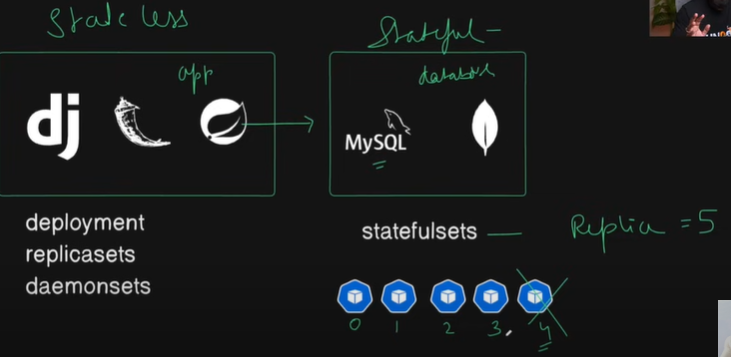
jab b hamare koi applications hothey hey django , flask , aur springboot apps ae saarey applications ,agar aapkey state maintain nahi hothi hey toh b chaltha hey . UI hey user kabhi use karega band karega → ae basically stateless hothey hey
is ka jo data rahega mysql , mongodb ae saarey db hey vo stateful rehthey hey
mysql ka data hey vo always persisted hona chahite - timeley usmey transactions matlab read write ae sab ek dum sahi sey hona chahiye state key aap kabhi bhi khilwat nahi kar sakthey when it comes to databases
jab b aap stateless applications hothey hey generally app use karthey hey
- deployment , replicaset , daemonsets etc
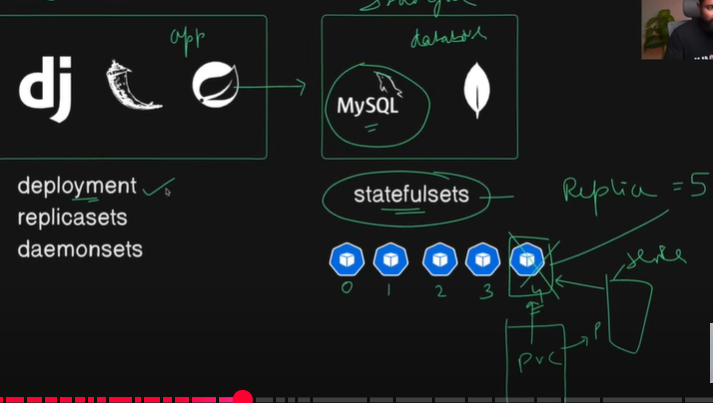
jab appki stateful applications like mongodb , mysql - use karthey hey stateful sets ismey b replica rehtha hey - ae jo pods banthey hey ae pod apney sath ek state carry karthey hey like 1, 2 ,3 ,4,5 sequence mey numberd hothey hey
vi statefulset.yml

kind: StatefulSet
apiVersion: apps/v1
metadata:
  name: mysql-statefulset
  namespace: mysql

spec:
  serviceName: mysql-service
  replicas: 3
  selector:
    matchLabels:
      app: mysql
  template:
    metadata:
      labels:
        app: mysql
    spec:
      containers:
      - name: mysql
        image: mysql:8.0
        ports:
        - containerPort: 3306
        resources:
          requests:
            cpu: 100m
            memory: 128Mi
          limits:
            cpu: 200m
            memory: 25Mi
        env:
        - name: MYSQL_ROOT_PASSWORD
          valueFrom:
            secretKeyRef:
              name: mysql-secret
              key: MYSQL_ROOT_PASSWORD

        - name: MYSQL_DATABASE
          valueFrom:
            configMapKeyRef:
              name: mysql-config-map
              key: MYSQL_DATABASE
        volumeMounts:
        - name: mysql-data
          mountPath: /var/lib/mysql

  volumeClaimTemplates:
  - metadata:
      name: mysql-data
    spec:
      accessModes: [ "ReadWriteOnce" ]
      resources:
        requests:
          storage: 1Gi
pehle ek namespace mysql bana dethye hey phir statefulset.yml
mai is valey statefulset ko ek spec dedunga ismey pehle replica:3 , mai lables and selectors use karunga - selector: matchLabels: app: mysql
important part template mey aatha hey
jo mysql ka container rehtha hey vo always environmnet variables mangtha hey
env : mysql key jo environment dalna hey vo kaisa dalthey hey → k8s stateful environmnet google it
but agar aapko ek mysql ka stateful set banana hey is pod ko jo storage chahiye volume chahiye vo aapko stateful set mey hi dalna padega
mai yaha aek volume banaunga aue volume claim template b ismey hi karunga
jaisa mainey statefulset replica hey uska pod ka ek service b honi chahiye - iski service ki ek khasiyath rehthi hey - headless service - iska sab same rahega
              kind: Service
              apiVersion: v1
              metadata:
                name: mysql-service
                namespace: mysql
              spec:
                clusterIP: None
                selector:
                  app: mysql
                ports:
                - name: mysql
                  protocol: TCP
                  port: 3306
                  targetPort: 3306
ae service internally use key liye kahi expose nahi hothi , bahari duniya key liye acccess naho honi chahiye isliye agar mere app ko data chahiye thorough service it can able to access
ae jo service sirf aur sirf statefulset key sath bind rahey isliye → statefulset.yml mey jakey bind kardo
kubectl apply -f service.yml
kubectl apply -f statefulset.yml
kubectl get pods -n mysql
kubectl get svc -n mysql
kubectl exec -it mysql-statefulset-0 -n mysql -- bash
mysql -u root -p = root
mainey ek stateful set key sath mysql ki deployment bandiya aur vo b scalable hey
show databases;
kubectl delete pod mysql-statefulset-0 -n mysql
kubectl get pods -n mysql -→ jab b hum delte karey with the same pod name it creates a new one , that is how k8s maintains the state
pod humesha koi aur create karthey na charoka name random honge , koi b delet kardo koi naya name banjayega but is case mey aisa nahi hotha , is case mey vahi name ka pod delete kiya vahi name sey new vala bantha
iski service, iski volume template , variables , sab tightly coupled rehtha hey , isiliye jab b naya pod bantha hey vo hamesha state ko sath lekey chaltha hey , isiliye known as stateful set
deployment mey jo b pods create banthey hey alag name sey banthey hey .
ConfigMaps: kaisey aap aapney pod mey jo b variables hey jo b aapka data hey kaisey ek dam secure tarikheysey pauncha sakthey hey chalo dekhthey hey
aisa samjo ki aapney jo create kiye na statefulset banaya ismey ae jo mysql dataabase ki value dalina kal ko agar aapko change karni padegi aapko stateful sey mey aakey change karna padegi
- ki mai chahtha hun ki jithey b meri environmenyt variables , varibales vo alag ek file mey rahey , jo merey conf rehthey hey vo ek alag file mey rahey
kind: ConfigMap
apiVersion: v1
metadata:
  name: mysql-config-map
  namespace: mysql
data:
  MYSQL_DATABASE: devops
- isko aap use karoge stateful set
vim statefulset - jo mera env mysql_Data base hey vo value mai direct nahi liunga liunga valueFrom : name: mysql-config-map ; key: MYSQL_DATABASE; ae as a configMapKeyRef karkey dalna padega
aapki jo config map hey usmey jo aap key dali hui hey key ref sey
kubectl apply -f statefulset.yml
kubectl get statefulset -n mysql
kubectl delete statefulset -n mysql
kubectl apply -f statefulset.yml
kubectl get pods -n mysql
jaisey aapney config maps mey normal plane text valey key:value pair mey data dala usi prakar mey aap agar encode karkey dalna chahthey ho , generally passwords ko encode karna chahthey ho toh secrets mey dalthey hey
Secrets:
vim secret.yml - ismey jo b password hey na usko base64 encode karkey dalna padega
- echo “root” | base64
apiVersion: v1
kind: Secret
metadata:
  name: mysql-secret
  namespace: mysql
data:
  MYSQL_ROOT_PASSWORD: cm9vdAo=  # base64 encoded for "root"
kubectl apply -f statefulset.yml
kubectl get pods -n mysql
ResourceQuota & Limits : ek pod hey ae jo aapka pod aapkey host machine mey chalra hotha hoga - ab is machine ka kuch configuration hoga t2.medium like 4gbram 2cpu
lets say ae pod hey nginx - pod pey aagaya traffic badthey jara jara aur jheltha jara 4gb ki ram ae akela pod hi khagaya
lets say aur ek pod aagya agar nginx pod hi khagaya toh 4gb toh ae bichara dusra pod kya karega isko kuch b nai milega
jab b aap apney pods banathey hey - aap usmey kithna resources aapko chahiye , maximum kithna ley saktha hey pod ae aapko dena padega decide karna padega
meri deployment file hey us file mey humko limit deni hothi hey
            resources:
                      requests:
                        cpu: 100m
                        memory: 128Mi
                      limits:
                        cpu: 200m
                        memory: 256Mi
ae toh minimum request , max 2 roti sey zyada nahi chahiye uske liye limits use karthey hey
issey na aapka pod ithna hi resource leyega -→ aap isko create karkey describe kardo
Probes:
kaam chota sa hi rehtha hey - probes aisa samjo ki vo 3 type key hothey hey
liveness Probe
readiness probe
startup probe
probe matlab ek request rehthi hey ki ae aapka pod dhang sey kaam karrahey yah nahi - lets say ae pod pey 8000 pey chalra but aapko make sure karna hey ki vo 8000 mey hi chalrahey , agar aapka pod zinda hey yah nahi aapko live hey yah nahi liveness probe test kartha hey
agar aapka pod create hotha hey yah ready ho gaya thab readiness probe test kartha hey
startup probe - jab aapka pod start hora hey startup probe key sath request check kartha hey
livenessProbe:
          httpGet:
            path: /
            port: 8000
is pod mey mera readiness aur liveness probe trigger hua yah nahi
kubectl describe pod podname -n nginx
probe just check kartha hey internally - yaha pey intervals b dal sakthey hey initial delay ae sab
Taints & Tolerants:
toh is valey diagrams ko dekhthey hey , mai jabbi apney cluster ko boltha hun kubectl apply -f deploy - api- server scheduler ko boltha hey bhai pod schedule kardo , schedular apney hisab sey dekhta hey pod woker 1 , 2 ,3 kounsey node mey bhejna hey ae schedular decide kartha hey
taint , tont - hum tont marthey hey na , uskey ghar ko nahi jathey na agar ek relative humko tont kartha hi rehthey hetoh
vaisa hi aap schedular ko cahthey hey ki node1 pey pod schedule na karey toh aap node1 ko taint kardogey
taint is a way of telling your k8s cluster ki is particular node mey aap pod nahi schedule karey
kuch kuch relatives taunt tont marthey hey lekin hum ghar chale jathey hey sehlethey hey tolerate
aapki koi tainted server hey lekin aapko chalana chahthey ho usko aap tolerants dal sakthey ho
hum kaisa taint karwana hey
kubectl get ns → cd nginx -→ cat pod.yml - ae aek pod hey ae jo pod hey agar mai chalaunga ae kidar jayega agar mai worker node ko taint kiya toh ae pod us node pey run nahi hoga
kubectl taint node tws-cluster-worker prod=true:NoSchedulekubectl taint node tws-cluster-worker2 prod=true:NoSchedulekubectl taint node tws-cluster-worker3 prod=true:NoSchedulekubectl apply -f namespace.ymlkubectl apply -f pod.ymlkubectl get pods -n nginx - ae pending mey hey kiun matlab , hamare 3 ko 3 nodes tainted hey , jo b taint ho jatha hey usmey schedule nahi kar patha .
ae pod bechara ko ek node dey dethey -
kubectl taint node tws-cluster-worker3 prod=true:NoSchedule-- hyphen matlab untaintedTolerants:
tainted pod mey b mai kaisey chalaunga - pod key spec mey jakey - tolerations: - key: “prod” operator: “Equal” value: “true” - aisa koi b cheeze taint pada hey jismey pod=true and noschedule dala hey tolerate karkey chalado karkey bolre
tolerations:
    - key: "prod"
      operator: "Equal"
      value: "true"
      effect: "NoSchedule"
HPA & VPA: Horizantal pod autoscaling & vertical pod autoscaling :
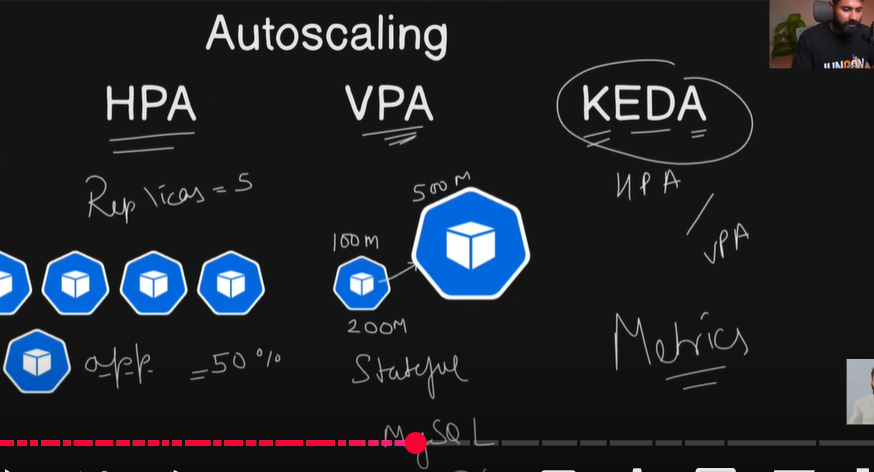
sabsey pehley samajthey hey autoscaling - autoscaling ab har koi microservice architecture mey aagaye ab sabko based o traffic autoscale karna chahthey hey
jab autoscale ki bath aathi hey 3 types hey
HPA: matlab agar aapka jo pod hey mast traffic aagaya ae jo pod hey apney aap scale hojayega like replica ban jathey hey , replica ko badathey ho number badathey hey - normal applications use kar sakthey
VPA: pehley aapka pod aisa tha vo maxium resources 100mb use kartah hey max ae 200mb ka traffic jhel saktha hey - agar isko autoscale karna chahthey ho ae banjayega hulk ae pod ki thakath ko badathey ho , resource and limits ko badathey hey - basically ae stateful applications ko use karthey hey
KEDA - kubernates event driven autoscaling : vo dekhtha hey aapka event kaisa hey , bohot zyada traffic or rerouting hey toh vo either hpa pey lagadeyega bohot zyada overload or stress aara hey ae vpa mey laga dega - based on the nature of your metrics or events keda hpa or vpa sey selct karletha
metrics kya hotha hey - countafiable resources key numbers like cpu and ram kithna use hora hey
kubectl get nodes
ae jo node hey kithna traffic aara hey , kithna kya hora hey iski metrics aapko pata honi chahiye iski metrics
kubectl top node → issey metrics nahi hey - kubesystem mey metrics severs ,hona chahiye and vo metrics server aapkey node mey aapkey pod mey kithne resources , cpu kya scena hey kithney use horey ae sab metrics detha hey
miniqube hey toh usmey karlenge - miniqube addons enable metrics-server- ae karkey badiya chala sakthey hey
kind cluser mey metrics chahiye - toh aap github mey milega - usmey copy karkey idhar run karo -→ github hpa and vpa ey javo
If you are using a Kind cluster install Metrics Server
kubectl apply -f https://github.com/kubernetes-sigs/metrics-server/releases/latest/download/components.yaml
- Edit the Metrics Server Deployment
kubectl -n kube-system edit deployment metrics-server
- Add the security bypass to deployment under
container.args
- --kubelet-insecure-tls
- --kubelet-preferred-address-types=InternalIP,Hostname,ExternalIP
- Restart the deployment
kubectl -n kube-system rollout restart deployment metrics-server
- Verify if the metrics server is running
kubectl get pods -n kube-system
kubectl top nodes
kubectl top pod -n nginx
jaisey humney coreconcepts key nginx , pv pvc key liye statefulsets mysql , django notes app aek application dekhey
ab hpa and autoscaling key liye ek naya dekhenge apache - ae b ek httpd server hey
ek namespace banana hey - kubectl create namespace apache , ab mujhey is apache ka deployment banana hey us deployment ko hpa sey automatically scale kar wana hey
Steps to implement HPA:
Update the Deployments:
- We'll modify the existing Apache deployment YAML files to include resource requests and limits. This is required for HPA to monitor CPU usage.
    vi apache-deployment.yaml

    apiVersion: apps/v1
    kind: Deployment
    metadata:
      name: apache-deployment
    spec:
      replicas: 1
      selector:
        matchLabels:
          app: apache
      template:
        metadata:
          labels:
            app: apache
        spec:
          containers:
          - name: apache
            image: httpd:2.4
            ports:
            - containerPort: 80
            resources:
              requests:
                cpu: 100m
                memory: 128Mi
              limits:
                cpu: 200m
                memory: 256Mi
- sabsey important containers ki resources quota and limit set karni hey
    vi service.yml

    apiVersion: v1
    kind: Service
    metadata:
      name: apache-service
    spec:
      selector:
        app: apache
      ports:
        - protocol: TCP
          port: 80
          targetPort: 80
      type: ClusterIP
kubectl get all -n apachesudo -E kubectl port-forward svc/apache-service 8081:80 --address 0.0.0.0ae application ko public mey daldethey toh sab log access karengetoh mera cluster ruk saktha hey
mai chahtha hun - kubectl scale deployment apache-deployment -n apache —replicas=3 -→ ae manuall hey - hum dekha samja - ae scalling hey autoscalling nahi - autoscaling key liye hpa banana hey
            #apache-hpa.yaml
            apiVersion: autoscaling/v2
            kind: HorizontalPodAutoscaler
            metadata:
              name: apache-hpa
              namespace: apache
            spec:
              scaleTargetRef:
                apiVersion: apps/v1
                kind: Deployment
                name: apache-deployment
              minReplicas: 1
              maxReplicas: 5
              metrics:
              - type: Resource
                resource:
                  name: cpu
                  target:
                    type: Utilization
                    averageUtilization: 20
- kubectl get pods -n apache
kubectl apply -f hpa.yml
kubectl get hpa -n apache
ab ae jo url hey it works - isko load kaisa diyenge load bananey ka tarikha
aek pod banayenge - loadgenerator karkey
kubectl run -it load-generator —image=busybox -n apache — bash
Stress Testing
- To see HPA in action, you can perform a stress test on your deployments. Here is an example of how to generate load on the Apache deployment using 'BusyBox':
kubectl run -i --tty load-generator --image=busybox /bin/sh
- Inside the container, use 'wget' to generate load:
while true; do wget -q -O- http://apache-service.default.svc.cluster.local; done
This will generate continuous load on the Apache service, causing the HPA to scale up the number of pods.
- Now to check if HPA worked or not, open a same new terminal and run the following command
    kubectl get hpa -n apache
    kubectl get pods -n apache
Note: Wait for few minutes to get the status reflected.
agar mainey rok diya → watch kubectl get pods -n apache
kubectl get hba -n apache -→ humko samaj aagaya how HPA automatically scale the application same notes-app mey deployment mey resource and limit use karo and just change name deployment name in HPA.yml
kubectl apply -f deployment.ymlkubectl get pods -n ninxkubectl apply -f service.ymlkubectl apply -f hpa.ymlkubectl get hpa -n nginxkubectl get pods -n nginx
kubectl delete ns nginx .
Vertical pod autoscaler key files ko download karna padtha hey
- For VPA
git clone https://github.com/kubernetes/autoscaler.git
cd autoscaler/vertical-pod-autoscaler
./hack/vpa-up.sh  # jo jo prerequisite chahiye vpa key liye vo install karthi hey
Verify the pods on VPA
kubectl get pods -n kube-system
  vim vpa.yml

apiVersion: autoscaling.k8s.io/v1
kind: VerticalPodAutoscaler
metadata:
  name: apache-vpa
  namespace: apache
spec:
  targetRef:
    apiVersion: apps/v1
    kind: Deployment
    name: apache-deployment
  updatePolicy: # idhar aap update mode dalthey hey
    updateMode: "Auto" # Options: "Off", "Initial", "Auto"
kubectl get pods -n apachekubectl get hpa -n apachekubectl delete -f hpa.ymlkubectl apply -f vpa.ymlkubectl get vpa -n apachetake another terminal →
kubectl get svc -n apachekubectl get pods -n apachekubectl get vpa -n apachekubectl run -i -tty load-generator —image=busubox -n apache /bin/bashwhile true; do wget -1 -O https://apache-service.apache.svc.cluster.local ; donesudo -E kubectl port-forward svc/apache-service 8081:80 --address 0.0.0.0kubectl get vpa -n apachekubectl top pod -n apache—> this is how you have enlarged your pod resourcekubectl describe pod podname -n apache
kubectl top node
kubectl get pods -n apache -o wide
k8s node affinity
Node Affinity / node selectors : agar aapkey pod ko aapkey node pey schedule karana hey toh us node key bharemey thodasa batado like node name , type , key , resources agar usko match karthey hue milgaya
- node affinity is opposite to taint and tolerants
Cluster Administration :
RBAC( Role based Acess control):
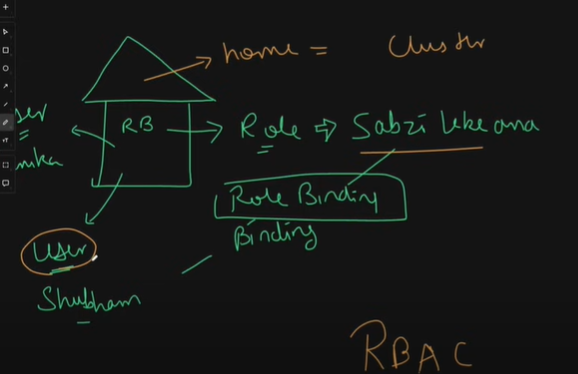
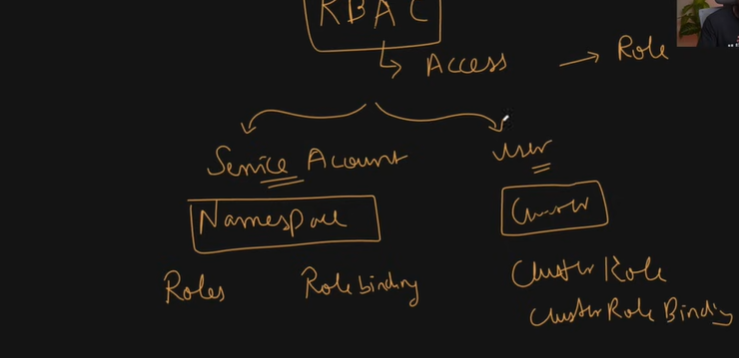
ae aapka ghar , aap ek ghar mey ho bolnekey liye aapka , lekin papa mummy ka haq hotha hey aap vaha key naukar b hothey hey - aapkey gharmey ek role hotha hey right ,
like kya kya cheeze karne wale - 1. breadearner , 2. house wife
lets say aek role hey mai sabji lekey aaney wala → hamare pass ek user hey shubham ab is shubham ko ae role dedetha hun sabji lekey aana , ae user
shubhamae aur ae role ek dusre sey kaisa bath karthey → throughrole bindingjab b aap rbac padthey ho ithna samjo kubernates key resources hothey hey uskey access aapka hey yah nahi uskey liye ek role bantha hey
home = k8s cluster - us cluster key andar kya kya kar sakthey hey kya kya nai kar sakthey hey us cheez ko rbac bola jatha hey
rbac padney key liye do cheeze padni padthi hey
service account : service account aapka aek temporary user jaisa hi rehtha hey, us service account mey as a user kya karthey hey lets say mai as a user ek anager hun ek manager name ka ek service account ho saktha hey - treated as a user only
ae namespace level pey b ho saktha hey
namespace level pey hotah hey role - kya deployment ko get , update , delete kar saktah hun - us service account ko is role ko denekey liye role binding
usi prakar cluser level pey role ni hothey us level pey hothey hey cluster role - us cluster role ko bind karnekey liye cluster role binding hotah hey
user : user aapka pura cluster level pey hothey hey - pure key pure cluster level pey
toh jab aap rbac padthey hey ek simple basha mey matlab hotah ehy aapka user or service account ko kithna access dey sakthey ho dena chahthey ho , kithna uska access ko controll kar sakthey hey
2 level pey kar sakthey hey - yah toh namespace level pey resources ko daldo or cluster level pey dal sakthey hey
kubectl get nodes
cd apache → kubectl get ns → kubectl get pods -n apache → kubectl delete -f . →jab b aap rbac samajthey ho
- kubectl auth whoami→current user info we will getkubectl auth can-i get pods
kubectl apply -f namespace.yml
kubectl auth can-i get pods -n apache # iam an admin so mai kisi b namespace mey ghuskey kuch b kar saktha hun
kabhi kabhi aapko alag alag apps banana padtha hey , aap nahi chavoge ki har ek user us application ko access kardo .
i dont want to give admin user to fresher what i he deltes the files so i will create a role
Create Roles and RoleBindings:
- Role for Managing Apache Deployment.
We'll create a role that allows managing Apache resources within the apache-namespace.
- Role for Managing Apache Deployment.
# apache-role.yaml
apiVersion: rbac.authorization.k8s.io/v1  # ae group agar apiGroups mey * devige th sab access
kind: Role
metadata:
  namespace: apache-namespace
  name: apache
rules:
- apiGroups: ["", "apps", "extensions"]
  resources: ["deployments", "services", "pods"]
  verbs: ["get", "apply","list", "watch", "create", "update", "patch", "delete"]
kubectl apply —f role.yml
kubectl get role -n apache # is role ko agar mujhey kisiko bind karna hoga toh mai isko bind kardunga
but uskey pehley mujhey service account chahiye - > vim service-account.yml
- Create Users (Optional):
If you are using a Kubernetes distribution that supports user management, you can create users and assign them the respective roles. Here, we'll use basic ServiceAccounts for simplicity.
#apache-serviceaccount.yaml
apiVersion: v1
kind: ServiceAccount
metadata:
  name: apache-user
  namespace: apache
kubectl apply -f service-account.ymlkubectl get serviceaccount -n apache# kya mera apache user kya mera deployment ko get kar saktha heykubectl auth can-i get pods -n apache —as=apache-user# agar mai as a apache-user mai get kar saktha hun kyajust ab thak ek serviceaccount user create hua , aur role create hua but role binding nahi hua
RoleBinding for Apache Manager We'll bind the role to a user or service account.
# apache-rolebinding.yaml
apiVersion: rbac.authorization.k8s.io/v1
kind: RoleBinding
metadata:
  name: apache-manager-binding
  namespace: apache
subjects:
- kind: User
  name: apache-user # This should be replaced with the actual user name
  apiGroup: rbac.authorization.k8s.io
roleRef:
  kind: Role
  name: apache-manager
  apiGroup: rbac.authorization.k8s.io
kubectl apply -f role-binding.yml
kubectl get rolebinding -n apache
kubectl auth can-i get pods —as=apache-user -n apache
Verify Roles and RoleBinding
To cross-verify the RBAC setup, you can perform a series of checks and actions to ensure that the roles and permissions are applied correctly. Here’s how you can do it:
- Check Roles:
kubectl get roles -n apache-namespace
Ensure apache-manager and nginx-manager roles are listed.
- Check RoleBindings:
kubectl get rolebindings -n apache-namespace
Ensure apache-manager-binding and nginx-manager-binding role bindings are listed.
Verify ServiceAccounts
- Check ServiceAccounts:
kubectl get serviceaccounts -n apache-namespace
Ensure apache-user and nginx-user service accounts are listed.
Test Access Using Impersonation
You can use the 'kubectl auth can-i' command to verify the permissions granted by the roles.
Test Apache User Permissions:
kubectl auth can-i create deployment -n apache-namespace --as=apache-user
kubectl auth can-i get pods --as=apache-user -n apache
kubectl auth can-i delete service -n apache-namespace --as=apache-user
# role base access control
jab aapko monitoring , logging us level key cheeze karni hothi hey thab aapko cluster role aur cluster role binding zaroori hothi hey
ab humlog dekhney valaey hey - rbac mey cluster level pey kaam kaisey hotha hey
cluster level pey kaam karna hey vo kiun karna hey
lets say mai purey cluster key metrics , monitor , logs dekhrahun us level pey mujheko chahiye hotha hey
ki jo hamara rbac service ACCOUNT BANAREY UNKO NAMESPACE LEVEL THAK KA HI ACCESS chahiye
agar aek user cluster level pey bantha hey cluster role an binding use hothi hey kiunki pura cluster ka monitor , logging sab karna hotha hey
ek dir create karenge mkdir dadhboard
4. Setting Up the Kubernetes Dashboard
- Metrics server
Deploy the Dashboard Apply the Kubernetes Dashboard manifest:
kubectl apply -f https://raw.githubusercontent.com/kubernetes/dashboard/v2.7.0/aio/deploy/recommended.yaml
is ney ek namespace banaya service banaya , secret , role banaya , cluster role b banaya
cluster role already bangaya toh isliye humko user create karkey us role ko role bind karna hey
Create an Admin User Create a dashboard-admin-user.yml file with the following content:
vim dashboard-admin-user.yml

apiVersion: v1
kind: ServiceAccount
metadata:
  name: admin-user
  namespace: kubernetes-dashboard
---
apiVersion: rbac.authorization.k8s.io/v1
kind: ClusterRoleBinding
metadata:
  name: admin-user
roleRef:
  apiGroup: rbac.authorization.k8s.io
  kind: ClusterRole
  name: cluster-admin
subjects:
- kind: ServiceAccount
  name: admin-user
  namespace: kubernetes-dashboard
Apply the configuration:
kubectl apply -f dashboard-admin-user.yml
ab mai jo mera cluster rehtha hey na us chalaney key liye b mehnat padtah hey
Get the Access Token Retrieve the token for the admin-user:
kubectl -n kubernetes-dashboard create token admin-userCopy the token for use in the Dashboard login.
Access the Dashboard Start the Dashboard using kubectl proxy:
kubectl proxy #--port=8001 --address=0.0.0.0 --accept-hosts="*"Open the Dashboard in your browser:
http://localhost:8001/api/v1/namespaces/kubernetes-dashboard/services/https:kubernetes-dashboard:/proxy/Use the token from the previous step to log in.
you have dashboard - ab cd nginx → kubectl apply -f namespace.yml
kubectl apply -f persistentvolume.yml
* kubectl apply -f apply .
* kubectl get all -n nginx —> aap dashboard mey jakey namespace select karlo aap sab dikhega - ae dashboarrd sab metric server, monitoring and logging
Custom resource definition:
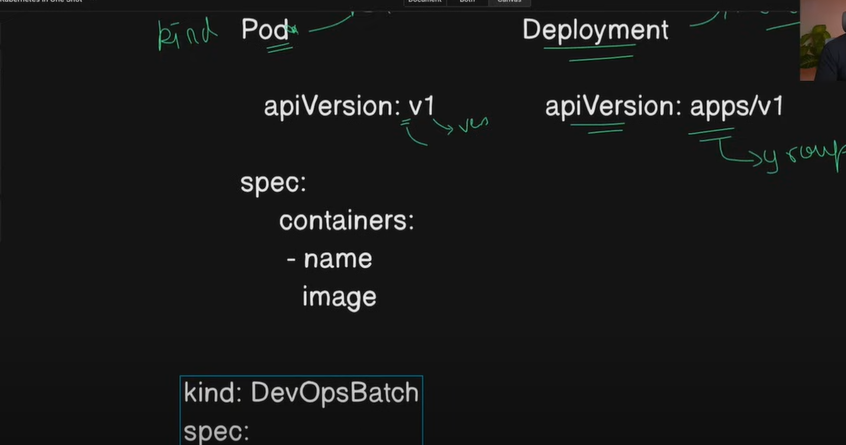
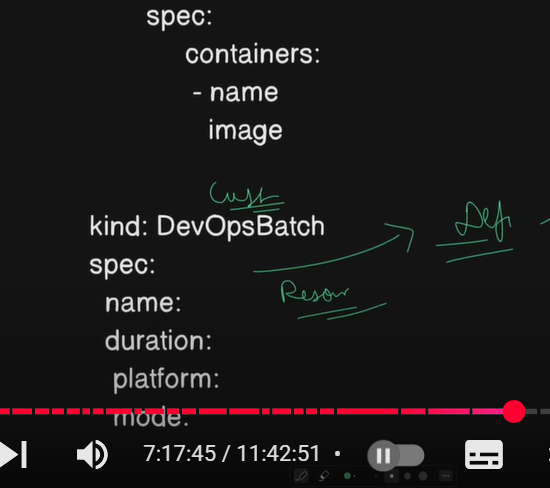
agar bath kare custom resource definition ki ki sabsey pehle samajna padtha hey resource kya hotha hey
toh jo k8s mey pods. services, deployment , services ae sab resources hothi hye
ae saare resources kubernates ko already pata hey ae servic e, namespace , ae kya hey is ka structure kya hey isko kaisa patha agar aapko aisey resources banana hey jo k8s mey nahi hey by default like custom resource
mai tws mey bohot saarey batches letha hun mai khudke liye mai saare batches ko store kar sakun.
jo pod ka structure aap khud key liye karna hey usliye custom resource definition use aathey hey
jaisa kind: pod hey vaisa kind:DevOpsBatch -k8s ko ae kya resource karkey pod ka jo taml structure hey vahi structure mey mai hava mey create nahi kar saktah mujhey is spec resource ko define karna padtha hey
custom resource sturuction is a definition with that we can create our own resources
cd crd: vim devops-crd.yml
apiVersion: apiextensions.k8s.io/v1
kind: CustomResourceDefinition
metadata:
  name: devopsbatches.trainwithshubham.com
spec:
  group: trainwithshubham.com
  names:
    plural: devopsbatches
    singular: devopsbatch
    kind: DevOpsBatch
    shortNames:
      - junoon
      - batches
      - tws
  scope: Namespaced
  versions:
  - name: v1
    served: true
    storage: true
    schema:
      openAPIV3Schema:
        type: object
        properties:
          spec:
            type: object
            properties:
              name:
                type: string
                description: "This is the name of the DevOps Batch"
              duration:
                type: string
                description: "This is the duration of the DevOps Batch"
              mode:
                type: string
                description: "This is the mode of the batch eg. Live/Recorded"
              platform:
                type: string
                description: "This is the platform of the batch"
kubectl apply f crd.yml
kubectl get crd → is ka faida aap isko use karkey ek devops custom resource bana sakthey hey
vim devops-cr1.yml

kind: DevOpsBatch
apiVersion: trainwithshubham.com/v1
metadata:
  name: junoon-batch-9
spec:
  name: DevOps-Zero To hero Junoon Batch 9
  duration: 3 months from 25th January 2025
  platform: trainwithshubham.com
  mode: Live as always
vi devops-cr2.yml

kind: DevOpsBatch
apiVersion: trainwithshubham.com/v1
metadata:
  name: junoon-batch-10
spec:
  name: DevOps-Zero To hero Junoon Batch 10
  duration: 3 months from 25th January 2025
  platform: trainwithshubham.com
  mode: Live as always
Operators: basically programming mey hothey hey like argocd , prometheuus operators , aur crd key resources ko programm kar sakthey hey
Kubernates-api : we can access resources via kubernates-api
- kopf -. python framework with the help of python code you can write
image scanning: we can do by using docker scout or trivy
secret-encryption: we have seen base64 encode and decode,
we cover network policies in cicd gitops , we will see eks in ci and cd , debugging and troubleshoot we have seen , resource utilization
kubectl top pod - resource utilization
kubectl top node
Helm:
dosto ab thak itnney saari manifest files. overwhelming hojatha ithna manifest files likhna uska kind likhna , template likhna
ek aisa tool hey jiskey vajhasey aap ae sab manifiest likhnesey muft hosakthey ,mey apt karkey package install karthey hey vaisaey hi aur har ek environmnet key liye laag sey manifest file banana nahi padegi sab kuch package rahega
ae tool ka name hey helm
helm aek package manager hey kubernates ka - ae package kya hey
like ubuntu mey apt key vajhasey aap koi packages install karthey hey aisey hi helm key through cheezon ko install karlethey ho using kubernates manifest file
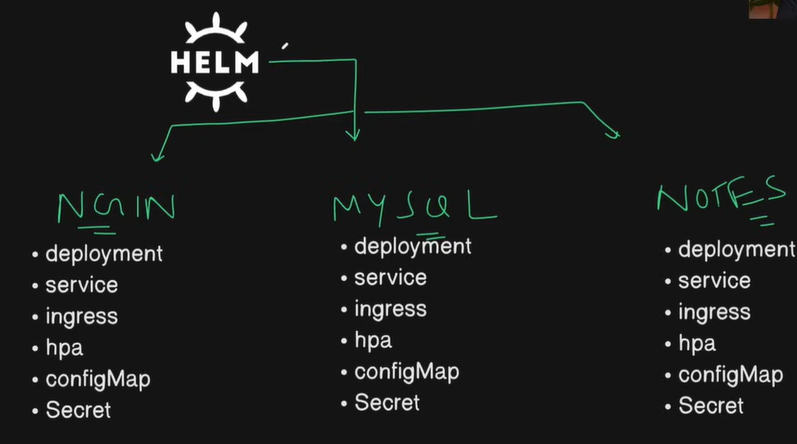
toh helm jo hotah hey ek package manager for k8s, toh aapko for ex: toh bahut saarey manifest files banana padtha hey for nginx , mysql , notes-app ka
us nginx key liye , aap deployment , service, ingress , hpa, configMap , sercret ae saarey cheeze har application key liye likhthey hey right
har cheez jab same hi honi hey kiun na hum ek package manager use karley aur vo package manager in sab cheezon ko install karega
Create one folder helm and helm key andar install karney wala hun helm charts - mkdir helm → cd helm
lets say nginx mey sab resources .yml hey aapney khud banaya aur aehi cheez automated sey ek pacjage manager key sath banani hothi hey toh helm sey kar sakthey hey pehle isko install karna padtha hey
This Helm chart deploys an Apache HTTP Server on a Kubernetes cluster.
Prerequisites
Kubernetes cluster running (local, cloud, or KIND).
kubectl installed and configured.
Helm 3 installed. Install Helm with:
curl -fsSL -o get_helm.sh https://raw.githubusercontent.com/helm/helm/main/scripts/get-helm-3
chmod 700 get_helm.sh
./get_helm.sh

helm version  # helm go mey likha hey
Chart Structure
apache/
├── Chart.yaml         # Chart metadata
├── values.yaml        # Default values for customization
└── templates/         # Kubernetes resource templates
    ├── deployment.yaml
    └── service.yaml
humlog ek helm chart banayanege
helm create apache-helm→ mai ek chart banara hunjiskey andar mai apache chalaunga
ls - cd apache-helm → ls hum ko milega chart.yaml , charts , templates , values.yml
tree
templates hey andar - sab resources .yml banadiya thats teh beauty of helm
manifest files likhna zaroori nahi → cd templates → vim deployment.yml - humko sirf values dalni hey bus
aap jo b change karna hey values mey jakey change karo idhar reflect hojayega
kuch b nahi likhna humko , helm ney banakey dega
un templates ko use karna hey values values.yml sey jathey hey
vim values.yml - isme jo b values hey vo udhar pey inject ho jathey hey
humko jo b chahiye vo values.yml mey dal sakthey hey
vim chart.yml - ae kya hey -ae jo b hum chart banare lets say apache, nginx kuch b uska info idhar rehtha hey
ab mujhey is chart ko package karna gey
helm package . → is package ko mai export , import kuch b kar saktha hun → cd ..
helm package apache-helm
ab mujhey is chart ko install karna hey -
→ helm install mai aapney chart ko kya name dena chahtha hun like lets say nginx key jagah apache dena chahtha hun
ab mujhey iska dev , prod , stae environment banana hey
mai isko name dey saktha hun → helm install dev-apache apache-helm
default name space key andar apache mey running hey
→
kubectl get deployment→kubectl get podshelm uninstall dev-apache→ saare deployment hojathey heyjab b aap koi helm chart install akrthey ho sathi sath mey namespace b dedo
helm install dev-apache apache-helm dev-apache —create-namespaceagar aap production key banare -
helm install prd-apache apache-helm prd-apache —create-namespacemai vales.yml mey 3 replica daldunga ab mai prd upgrade karna chahtha hun
vim chart.yml - change version 1.16.1
helm package apache-helm
helm upgrade prd-apache ./apache-helm -n prd-apache
kubectl get pods -n dev-aapche
kubectl get pods -n prd-apache # so it is eady to maintain the multiple environments
ab question aatha hey mera revision number 1 jismey 3 ki jagah 2 hi hey , uspey roll back karna hey
helm rollback prd-apache 1 -n prd-apachehelm create node-js-appcd node-js-app → vim chart.yml → vim templates/service.yml
vim values.yml → mai kya kar saktey hey - trainwitshubham/notes-app image → tag: latest ; port:8000 targetPort: 8000 ;
helm package node-js-app
helm install dev-notes-js-app -n node-js-app dev-node —create-namespace
- dev-env name , chart name - node-js-app and namespace
kubectl get pods -n dev-node
kubectl get svc -n dev-node
kubectl port-forward svc/dev-node-js-app 8000:8000 -n dev-node —address=0.0.0.0
within minutes you can run your microservices , you can instal anything and can run
help repo - google → chalo through helm argocd dekhenge
ArgoCD: search in google argocd -select helm
humko repo add karna padtha hey isliye humko repo serahc karna hey
helm search repo nginx
helm search repo argocd
helm repo add stable https://charts.helm.sh/stable
ab aapkey system mey ae stable repo add kardethi hey
helm install nginx-helm oci://registry-1.docker.io/bitnamicharts/nginx- helm uninstall nginx-helm
helm uninstall prd-apache -n prd-apache
lets say you are asked to install mongodb
helm install mongodb-helm oci://registry-1.docker.io/bitnamicharts/mongodb -n mongo --create-namespace- kubectl get pods -n mongo # agar mai karunga - ek init container chalra hey - aapka mongo db container chalra hoga
kubectl exec -it mongodb-hel, -n mongo — bash → ls → monosh
aisey helm key through ham cheezon ko deploy kar sakthey hey
helm list -n mongohelm uninstall mongodb-helm -n mongo
Side car containers vs Init containers - iska parent topic hey pod - generally hum pods create karthey hey , ismey containers chalathey hey usmey sey b init container hotha hey ek side car container hotha hey
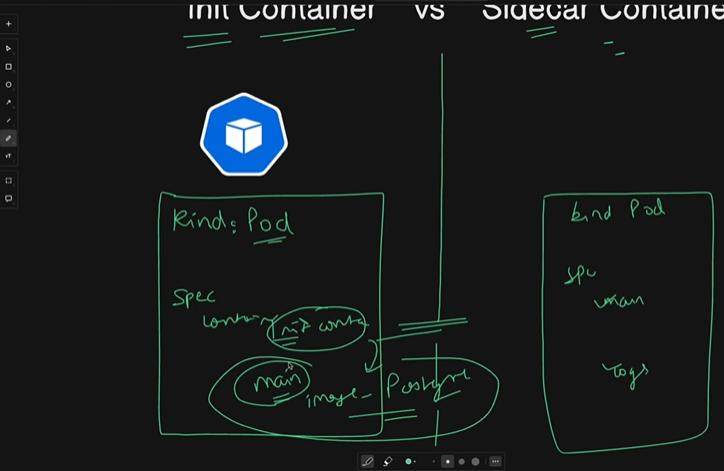
diff kya hey → aisa samjo ki ek pod hey jo aap pod key liye manifest file banathey hey iska kind rehtha hey pod
bus uskey andar spec iskey andar containers rehthey hey ek main container rehtha hey jismey aapka application chalna chaiye , bakhi init and side car containers main container ko help karnekey liye rehtha hey
jaisey aap db banare , us db ko bananey key liye main container liya usmey image daldiya - is postegres ki jo main container bannesey pehley lets say koi onnections , path kuch b chahiye hoga - us cheez ko initialize karnekey liye ek init container lagtha hey
init container jo main container chalnesey pehley jo cheeze chahiye vo init cont dey detha hey
pehle folder banega init container sey phir main container run hoyega
side car : jaisey batman , batmen pehley akeley ladtha tah ab kisi ka sath liye - ek simple single manifest file banegi iska kind pod ismey spec mey 2 containers rehthey hey - kuch logs copy , yah as aa helper main containers key sath help conatiner jaisa rethate hey
vim init.yml

kind: Pod
apiVersion: v1
metadata:
  name: init-test

spec:
  initContainers:
  - name: init-container
    image: busybox:latest
    command: ["sh","-c", "echo 'Initalization started ...'; sleep 10; echo 'Initization completed.'"]

  containers:
  - name: main-container
    image: busybox:latest
    command: ["sh","-c", "echo 'Main container started'"]
kubectl apply -f init.yml
kubectl logs init-test -c init-container -c main-container
kubectl logs init-test -c init container
kubectl get pods
kind: Pod
apiVersion: v1
metadata:
  name: sidecar-test

spec:

  volumes:
  - name: shared-logs
    emptyDir: {}

  containers:
  # produce logs
  - name: main-container
    image: busybox
    command: ["sh","-c", "while true; do echo 'Hello Dosto' >> /var/log/app.log; sleep 5; done"]
    volumeMounts:
    - name: shared-logs
      mountPath:  /var/log/

  # display logs
  - name: sidecar-container
    image: busybox
    command: ["sh","-c", "tail -f /var/log/app.log"]
    volumeMounts:
    - name: shared-logs
      mountPath:  /var/log/
side by side help karna iska kaam hey
kubectl apply -f side-car.yml
kubectl get pods
kubectl logs side-car-test -c main-container
kubectl logs side-car-test -c sidecar-container
init cont - google k8s
service mesh :
service mesh , dekho service mesh - service na ek mess hi hothi hey yaha aek pod hey iski service chalri hogi
suppose ek three tier application hey like voting , result, worker iskey alag alag services and ports like 5000, 50001 ,
aapkey pass zomato app hey - jismey ek service chalri hey menu , vaha sey dusri service jatha hun orders , aur events aisey bohot saarey services hey , delivery , hotel kaafi complex app der saari services chalri hogi ae saari services kaha sey jayegi isi cheez key aapko chahiye hotha hey ek gateway
us gateway key through saari services jayengi , pune mey hinzwadi mey bohot zyada traffic rehtha hey
ae traffic man controll karta hey kounsa traffic kidar redirect karna hey , is traffic ko redirect karnekey liye we need a tool called service mesh
service mesh ek gateway dey detha hey jissey aap services ko route , redirect kar sakthey hey basically complex service ko aap badiya ek dam distribute karsakthey ho jaisey ki har complexity simplyfy hogai
service mesh key liye ek popular tool hey istio , jo ki kaafi popular tool hey
go to ggole istio demo - lets install - clieck on instll - platform specific - > search kind - clieck on kind-istio
- cd istio → cd istio-practice
Download Istio
Go to the Istio release page to download the installation file for your OS, or download and extract the latest release automatically (Linux or macOS):
$ curl -L https://istio.io/downloadIstio | sh -Move to the Istio package directory. For example, if the package is
istio-1.26.1:$ cd istio-1.26.1cat readme.md
istio uses envoy which is a sidecar container /proxy which allows → vo aapkey jithney b services rehthi hey un sarey services key logs ko inject kartha hey
istiod ek control plane service discovery
The installation directory contains:
Sample applications in
samples/cd samples , cd .. , cd bin → ./istioctl
The
istioctlclient binary in thebin/directory.
Add the
istioctlclient to your path (Linux or macOS):$ export PATH=$PWD/bin:$PATHjaisa kubectl key commands kuectl sey chalathey vaisa hi ./istioctl
cd bin → mv istioctl /usr/local/bin
Install Istio using the
demoprofile, without any gateways:
$ istioctl install -f samples/bookinfo/demo-profile-no-gateways.yaml -y
Add a namespace label to instruct Istio to automatically inject Envoy sidecar proxies when you deploy your application later:
$ kubectl label namespace default istio-injection=enabled
Install the Kubernetes Gateway API CRDs
The Kubernetes Gateway API CRDs do not come installed by default on most Kubernetes clusters, so make sure they are installed before using the Gateway API.
Install the Gateway API CRDs, if they are not already present:
 $ kubectl get crd gateways.gateway.networking.k8s.io &> /dev/null || \
 { kubectl kustomize "github.com/kubernetes-sigs/gateway-api/config/crd?ref=v1.3.0" | kubectl apply -f -; }
Deploy the sample application
You have configured Istio to inject sidecar containers into any application you deploy in your default namespace.
Deploy the
Bookinfosample application:$ kubectl apply -f samples/bookinfo/platform/kube/bookinfo.yaml
The application will start. As each pod becomes ready, the Istio sidecar will be deployed along with it.
$ kubectl get services
- kubectl port-forward svc/productpage 9080:9080
agar merey pass 50 micro services kithno ka service manage and alag karun , url manage ahi sakthey isliye isio lagtha hey

$ kubectl get pods
Validate that the app is running inside the cluster by checking for the page title in the response:
$ kubectl exec "$(kubectl get pod -l app=ratings -o jsonpath='{.items[0].metadata.name}')" -c ratings -- curl -sS productpage:9080/productpage | grep -o "<title>.*</title>"
Open the application to outside traffic
The Bookinfo application is deployed, but not accessible from the outside. To make it accessible, you need to create an ingress gateway, which maps a path to a route at the edge of your mesh.
Create a Kubernetes Gateway for the Bookinfo application:
 $ kubectl apply -f samples/bookinfo/gateway-api/bookinfo-gateway.yaml
 gateway.gateway.networking.k8s.io/bookinfo-gateway created
 httproute.gateway.networking.k8s.io/bookinfo created
By default, Istio creates a
LoadBalancerservice for a gateway. As we will access this gateway by a tunnel, we don’t need a load balancer. If you want to learn about how load balancers are configured for external IP addresses, read the ingress gateways documentation.Change the service type to
ClusterIPby annotating the gateway:$ kubectl annotate gateway bookinfo-gateway networking.istio.io/service-type=ClusterIP --namespace=defaultTo check the status of the gateway, run:
 $ kubectl get gateway
 NAME               CLASS   ADDRESS                                            PROGRAMMED   AGE
 bookinfo-gateway   istio   bookinfo-gateway-istio.default.svc.cluster.local   True         42s
Access the application
You will connect to the Bookinfo productpage service through the gateway you just provisioned. To access the gateway, you need to use the kubectl port-forward command:
8$ kubectl port-forward svc/bookinfo-gateway-istio 8080:80
View the dashboard
Istio integrates with several different telemetry applications. These can help you gain an understanding of the structure of your service mesh, display the topology of the mesh, and analyze the health of your mesh.
Use the following instructions to deploy the Kiali dashboard, along with Prometheus, Grafana, and Jaeger.
Install Kiali and the other addons and wait for them to be deployed.
 $ kubectl apply -f samples/addons
 $ kubectl rollout status deployment/kiali -n istio-system
 Waiting for deployment "kiali" rollout to finish: 0 of 1 updated replicas are available...
 deployment "kiali" successfully rolled out
Access the Kiali dashboard.
$ istioctl dashboard kialifor i in $(seq 1 100); do curl -s -o /dev/null "http://localhost:8080/productpage"; done
Uninstall
To delete the
Bookinfosample application and its configuration, seeBookinfocleanup.The Istio uninstall deletes the RBAC permissions and all resources hierarchically under the
istio-systemnamespace. It is safe to ignore errors for non-existent resources because they may have been deleted hierarchically.$ kubectl delete -f samples/addons $ istioctl uninstall -y --purgeThe
istio-systemnamespace is not removed by default. If no longer needed, use the following command to remove it:$ kubectl delete namespace istio-systemThe label to instruct Istio to automatically inject Envoy sidecar proxies is not removed by default. If no longer needed, use the following command to remove it:
$ kubectl label namespace default istio-injection-If you installed the Kubernetes Gateway API CRDs and would now like to remove them, run one of the following commands:
If you ran any tasks that required the experimental version of the CRDs:
$ kubectl kustomize "github.com/kubernetes-sigs/gateway-api/config/crd/experimental?ref=v1.3.0" | kubectl delete -f -Otherwise:
$ kubectl kustomize "github.com/kubernetes-sigs/gateway-api/config/cr
Projects:
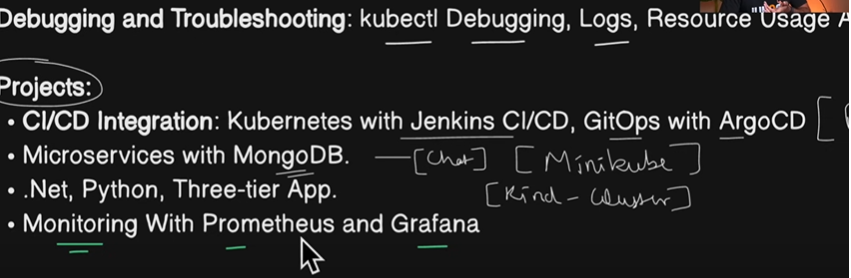
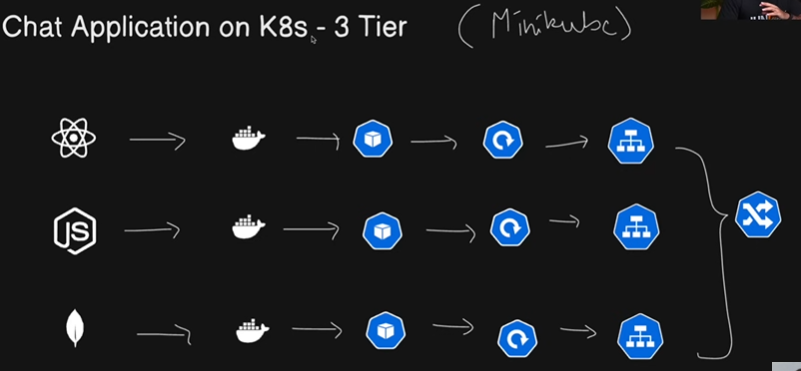
projects jo hum resume mey add kar sake
Chat application on kubernates -3 tier application - jaha pey front end react js and backend nodejs pey chalra and mongodb pey chalra
rule key muthabik - docker container aajayega - docker container sey bantha hey pod - iski deployment → is cheez ka service
miniqube start —driver=docker
kubectl get pods
cd projects:
shubham -full stack chat app → git clone https://github.com/LondheShubham153/full-stack_chatApp.git
login to dockerhub
cd backedn → docker build -t vaseem143/chatapp-backend:latest .
image tag and push the image
same with frontend also
now by using these two images and create the pod
create a namespace.yml
apiVersion: v1 kind: Namespace metadata: name: chat-app- kubectl apply -f namespace.yml
kubectl get ns
vi backend-deployment.yml
  apiVersion: apps/v1
  kind: Deployment
  metadata:
    name: backend-deployment
    namespace: chat-app
  spec:
    replicas: 1
    selector:
      matchLabels:
        app: backend
    template:
      metadata:
        name: backend-pod
        namespace: chat-app
        labels:
          app: backend
      spec:
        containers:
        - name: chatapp-backend
          image: trainwithshubham/chatapp-backend:latest
          ports:
          - containerPort: 5001
          env:
          - name: NODE_ENV
            value: production
          - name: MONGODB_URI
            value: "mongodb://mongoadmin:secret@mongodb:27017/dbname?authSource=admin"
          - name: JWT_SECRET
            valueFrom:
              secretKeyRef:
                name: chatapp-secrets
                key: jwt
          - name: PORT
            value: "5001"
apiVersion: apps/v1 kind: Deployment metadata: name: frontend-deployment namespace: chat-app spec: replicas: 1 selector: matchLabels: app: frontend template: metadata: name: frontend-pod namespace: chat-app labels: app: frontend spec: containers: - name: chatapp-frontend image: trainwithshubham/chatapp-frontend ports: - containerPort: 80 env: - name: NODE_ENV value: productionapiVersion: apps/v1 kind: Deployment metadata: name: mongodb-deployment namespace: chat-app spec: replicas: 1 selector: matchLabels: app: mongodb template: metadata: name: mongodb-pod namespace: chat-app labels: app: mongodb spec: containers: - name: chatapp-mongodb image: mongo:latest ports: - containerPort: 27017 env: - name: MONGO_INITDB_ROOT_USERNAME value: mongoadmin - name: MONGO_INITDB_ROOT_PASSWORD value: secret volumes: - name: mongo-data persistentVolumeClaim: claimName: mongodb-pvcapiVersion: v1 kind: PersistentVolume metadata: name: mongodb-pv namespace: chat-app spec: accessModes: - ReadWriteOnce capacity: storage: 5Gi hostPath: path: /dataapiVersion: v1 kind: PersistentVolumeClaim metadata: name: mongodb-pvc namespace: chat-app spec: accessModes: - ReadWriteOnce resources: requests: storage: 5Gikubectl apply -f pv.yml
kubectl get pv -n chat-app
kubectl apply -f pvc.yml
kubectl get pvc -n chat-app
kubectl apply -f mongodb-deployment.yml
kubectl get pods -n chat-app
kubectl apply -f frontend.yml
kubectl apply -f backend.yml
vi backend-service.yml
apiVersion: v1
kind: Service
metadata:
  name: backend
  namespace: chat-app
spec:
  selector:
    app: backend
  ports:
  - port: 5001
    targetPort: 5001
kubectl apply -f backedn-service
kubectl apply -f frontend -service
kubectl apply - ffrontennd-deployment.yml
kubectl get pods -n chat-app
apiVersion: v1
kind: Service
metadata:
  name: frontend
  namespace: chat-app
spec:
  selector:
    app: frontend
  ports:
  - port: 80
    targetPort: 80
About the author
Hi, I'm vaseem akram, a dedicated and passionate DevOps Engineer with extensive experience in automation, continuous integration, and infrastructure management.
Comments
Join the discussionNo comments yet. Be the first to comment.